
What Is Duplicate Content? Solutions for Fixing Duplicate Content
Duplicate content means that identical content can be accessed multiple times on different URLs.
A distinction is made here between three different types: by internal, external and similar (Near) Duplicate Content.
1. Internal Duplicate Content – Content that exists on a website on different URLs (e.g., when the site can be accessed separately via http:// and https://).
2. External Duplicate Content – Content that can be accessed on different websites. This type is often found in shops when they copy product descriptions 1:1 from manufacturers on the internet.
3. Near Duplicate Content – Content that is very similar to one another (e.g., the same text blocks reused across multiple URLs, or text blocks that have only been rewritten very slightly).
Examples of internal duplicate content:
➢ The website is accessible with and without www.
➢ URL parameters and session IDs in the URLs
➢ Recurring, identical product descriptions
➢ Pagination of category subpages (page numbering)
➢ Identical category and tag pages (overview pages)
➢ Meta tags, such as an identical title tag, are used simultaneously on different URLs
We do not speak of duplicate content, when a short intro and a headline of posts are used to tease them on an overview page. Verbatim or similar quotes that appear only occasionally in a text likewise pose no threat.
Why Is Duplicate Content a Problem, and How Does Google Evaluate Duplicate Content?
Duplicate content generally does not lead to any penalty from Google. One exception is the use of duplicate content to artificially push a website up in the search results using spam methods (Black Hat SEO).
Such spam methods, such as scraper sites (stolen content) and spinning content (automatically rewritten texts), are penalized manually when discovered.
The biggest problem for Google is understanding which URL should rank when content is duplicated. If the same or very similar content exists on different URLs, it is difficult for the Googlebot to decide which URL should be found for which content in the search results. In such a case, Google decides this itself – and unfortunately not always correctly. That is why it is important to avoid DC and to show Google clearly which URL should rank for which content.
Google also wants to have websites in the index that offer users notable added value with unique and high-quality content. This is not the case with copied texts.
In addition, the company does not want to send its crawlers over a website unnecessarily often – time and other resources are meant to be saved. On a website with a lot of duplicate content, the crawler may not come by as often as on websites that are free of duplicated or similar content. However, the crawl budget is only relevant for very large websites (on the order of hundreds of thousands of URLs); for normal websites it is not a ranking factor.
You can find a good video on this topic from Google itself:
Google normally does not penalize duplicate content.
Instead, Google clusters the duplicated URLs, selects a representative canonical URL, and filters the rest out of the search results. In doing so, ranking signals (e.g., links) are bundled onto the selected URL – or, in the case of uncontrolled duplication, split across multiple URLs and thereby diluted.
So avoiding it is less about “impunity” than about ensuring that the URL you want receives the signals and ranks.
Finding Duplicate Content
There are various ways to identify the different types of DC:
- Analyzing Internal Duplicate Content
With the free Google Search Console you can find indications of duplicate content. The former “HTML Improvements” report was shut down at the end of March 2019; today, use the “Page Indexing” report (e.g., status “Duplicate without user-selected canonical”) as well as the URL Inspection tool.
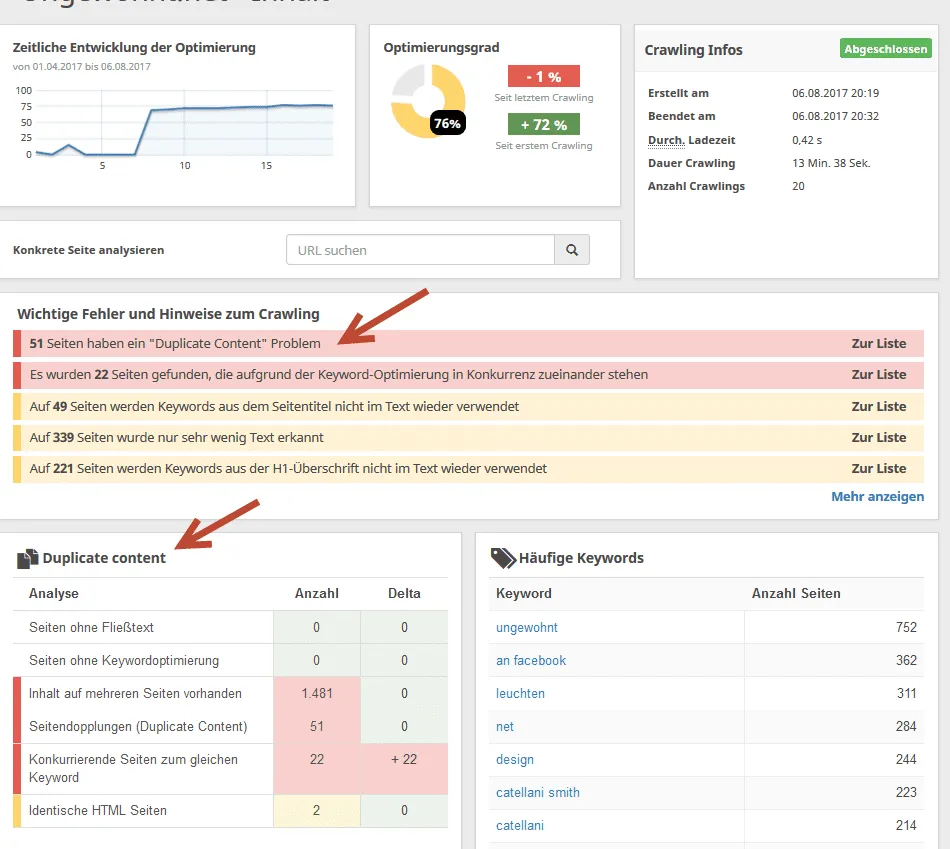
With paid analysis tools such as Seobility and many other on-page analysis tools, you can have duplicate content displayed.
On Siteliner.com you can have your website checked for duplicate content free of charge.
- Analyzing External Duplicate Content
Via the website Copyscape you can have it shown whether there are copies of your URL/website on the web. The analysis tool checks the web for external sources that have similar or identical matches to your query.
- Via Google Search (external as well as internal DC)
Both internal and external content can be found via Google Search. To do this, enter a passage of text that you think appears twice on your or another website. Put the text passage in quotation marks (“”) in the search – if you now get multiple results displayed, you should check whether these results show identical content.
- Analyzing Near Duplicates
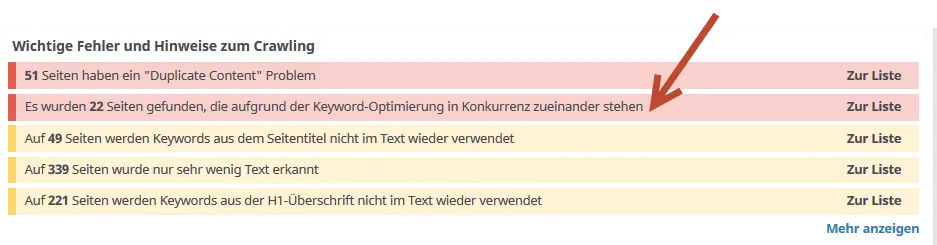
With the tools already mentioned, such as Seobility, texts that are very similar to one another can often also be identified. Under the item “Content” -> “Competing pages for the same keyword,” you can often find pages that have near DC. Siteliner.com also shows you URLs on your website that resemble one another. At Seobility.net, under “Content” -> “Duplicate Content,” you will find all pages listed that compete with one another due to keyword optimization.
Solutions for Duplicate Content
If the analysis reveals that you have DC problems on your website, you should act and fix the problems. Below, I show a few ways to fix DC.
✔ Redirects for the domain and individual URLs
A domain should be reachable either with www. or without: assuming that your website should only be reachable via www., you must enter a corresponding redirect command in the .htaccess file.
Furthermore, your website should, if you have it, only be accessible via https://.
If you have old URLs that contain identical content compared to your new website, you should redirect them accordingly with a 301 redirect. You also enter this command in the .htaccess file of your site. An example:
RewriteRule ^alte-url/?$ /neue-url/ [R=301,L]
On the website: http://www.htaccessredirect.de/ there are more tips on how to configure the .htaccess with redirects.
✔ Setting pages to “noindex”
By entering a meta tag with “noindex,follow,” you instruct Google not to include the page in the search results. This allows duplicate content to be fixed quickly. However, keep in mind that these pages will continue to be checked by Google. If a page is no longer needed at all, consider whether it might make sense to delete it and/or redirect it via a 301 redirect.
Rule of thumb for telling them apart: noindex is suitable when a page should remain accessible but not rank; a 301 redirect is right when the page is permanently replaced or resolved.
✔ Canonical Tags
With the help of the Canonical Tag you can indicate which URL is the original and which copy should be ignored by Google. An example in the <head>:
<link rel="canonical" href="https://www.beispiel.de/original/" />
✔ Prevent indexing but keep the page crawlable
<meta name="robots" content="noindex,follow" />
✔ Multilingual websites
Duplicate content problems can often occur on multilingual websites. Here, the hreflang annotation is the right tool.
For country- or language-specific versions of the same page, hreflang tells Google which language or country version should be served to which target audience, e.g.:
<link rel="alternate" hreflang="de-DE" href="https://www.beispiel.de/" />
<link rel="alternate" hreflang="en-US" href="https://www.beispiel.com/" />
Important: hreflang complements the canonical and does not replace it – both language versions remain indexable.
✔ Remove copied content or completely rewrite / rework it
Stolen product descriptions and reused texts should disappear from a website quickly. Google wants to see unique texts on your website and does not exactly view copied content as a sign of high quality.
Solutions for Duplicate Content That Are Not Recommended
⚡ Excluding the Google crawler via the robots.txt file to fix DC is not recommended, because exclusion does not necessarily result in the URL being removed from Google's index. This way, the duplicate content remains; Google simply can no longer crawl it again.
⚡ The “Removals” report (temporary removal tool) in the Search Console should also not be used to fix duplicate content, because URLs are only excluded from the index temporarily here and are likely re-included afterwards.
Tips from Google on Avoidance
On https://support.google.com/webmasters/answer/66359?hl=de there are many tips from Google itself on avoidance and remediation:
- Use 301 redirects
- Always use the same URL structures
- Use the Search Console to specify certain language versions, for example
- Avoid recurring text blocks
- Do not publish similar content and copied content, or set it to noindex
Summary
Unique text on a website is a sign to Google of high quality and offers the reader added value. So do everything you can to find and fix DC problems. With various SEO tools, you can quickly find the culprits and react accordingly. Either delete duplicate content or set duplicate content to “noindex,follow.”
If another website copies your content 1:1, you should contact the webmaster and point this out, and if necessary even threaten legal action. Your own content on your website is your most valuable asset and should be maintained accordingly.
Quellen
SEO & GEO check
Want more visibility – in search engines and AI answers?
We analyse your potential and show concrete next steps. Free and non-binding.