
Submit your website to search engines & chat AIs (Google, Bing, ChatGPT & Co.)
Submitting a website to search engines means actively pointing Google, Bing and others to a new page. These days it is rarely necessary: search engines find new websites on their own, provided they are technically reachable and linked. Google Search Console and Bing Webmaster Tools can still be used to speed up indexing and to check that it happened.
In the past, it was common to submit your website to well-known search and web directories such as the (long-since-closed) DMOZ just to be found at all.
These days, well-known search engines like Google or Bing are able to find and index a new website on their own (adding it to their search results) – provided certain requirements are met.
This means a webmaster no longer has to submit their site anywhere to be included in well-known search engines and chat AIs.
Given the millions or even billions of pieces of data that the search engine bots (crawlers) have to read, it can still make sense to deliberately “submit” your own website to search engines in order to speed up indexing or avoid technical problems.

Submitting your website to Google
With a market share among search engines in Germany of just over 90%, Google has become one of the most important sources of relevant visitors.
That is why it is important for many webmasters that their own website is found as well as possible on Google.
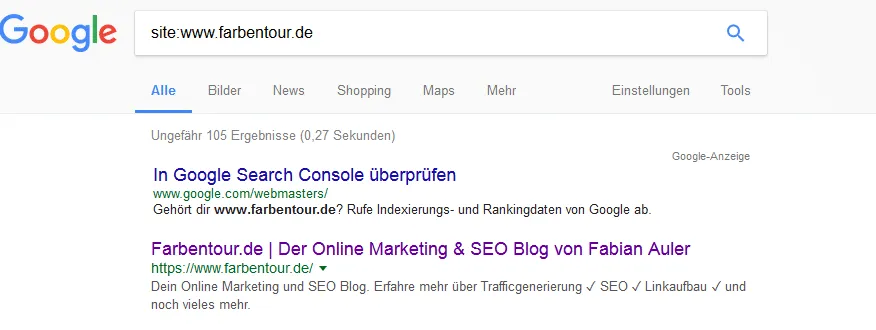
To check whether your site is already listed on Google, simply enter
“site:yourURL.com”
. If your site appears in the search results, it is present in Google's index.
Here is an example with my website Farbentour.de:
Google Search Console
So that your own website can be crawled by Google as quickly as possible, you have to create an account with the Google Search Console.

For the sign-up to be successful, you also have to open a Google account beforehand. This can be created via this link.
Registering your website in the Search Console
Once the sign-up in the Search Console has worked, you can enter your website's URL under the “URL prefix” tab. This is easier than using the “Domain” tab.

Follow the instructions to add your website. Once the site appears in the Search Console, you can have your site indexed by Google quickly and easily via the following two methods. If there are any obstacles, such as the search engine bot being blocked, this will also be shown here.
1. URL inspection
Using the “URL inspection” feature, the indexing of your website can also be sped up.

2. Submitting a sitemap to Google
Using the “Index” -> “Sitemaps” -> “Add a new sitemap” feature, you can (if one has already been created) enter your website's Sitemap.xml file. As a rule, submitting it also makes indexing happen faster.

If you have a WordPress website and don't yet have a Sitemap.xml file, you can easily have one created with this plugin: https://de.wordpress.org/plugins/google-sitemap-generator/
Was indexing successful?
Whether indexing was successful is something you can find out with the search command “site:yourURL” already mentioned above. If the URL appears, your domain has been added to the index.
Adding your website to Bing (and Yahoo)
Bing and Yahoo currently represent the biggest competition for Google in the search engine market. Since Yahoo also works using Bing's search technology, it is enough to have your website indexed by Bing in order to appear in Yahoo as well.
Submitting your website directly to Bing
Whether a manual indexing via the URL is necessary at all is something you can likewise find out via the search operator on Bing – e.g. with “site:yourURL”. If your website is shown, it has already been indexed by Bing.
Example:

Registering your website via the Bing Webmaster Tools
If your website is not indexed, you can submit it for indexing via the Bing Webmaster Tools and enter your site's XML sitemap there.
To do this, you first have to create a Microsoft account. If you don't yet use a webmaster tool, you can sign up via this link: https://www.bing.com/webmasters/about.
There, much like in the Google Search Console, you first have to add your site and then enter your sitemap and have it retrieved.

Submitting your website to Yandex
Yandex is in a neck-and-neck race with Google for the number 1 spot among the most frequently used search engines in Russia. It is probably only a matter of time until Yandex gains popularity in Europe too.
To have your own website indexed by Yandex, this can be done much like with Bing and Google via their Webmaster Tools. Simply sign up at https://webmaster.yandex.com/ with the relevant website and trigger indexing via the URL https://webmaster.yandex.com/site/indexing/reindex/ and / or enter the sitemap here as well so that indexing is sped up: https://webmaster.yandex.com/site/indexing/sitemap/

Adding your website to ChatGPT
ChatGPT is not a classic search engine but an AI-powered language model. There is no way to “submit” a website directly to ChatGPT. However: when ChatGPT is used in the version with web access (e.g. GPT-4 with the browsing feature), it currently draws on Bing search to retrieve up-to-date information from the internet.
This means: anyone who is easy to find on Bing also has a higher chance of being taken into account in ChatGPT's answers – for example when users ask for current sources, facts or recommendations.
So that content can be found and used via ChatGPT, it should:
- be indexed on Bing and publicly accessible,
- be technically clean in its structure (semantic HTML, meta data, clear headings),
- and ideally be linked to from other relevant websites.
Directly signing up with ChatGPT is not possible – but through good visibility on Bing and other sources, the chance of being taken into account can be significantly increased.
Submitting your website to Perplexity
Perplexity draws on a combination of web search, language models and trustworthy sources when answering user queries. Unlike classic search engines, Perplexity offers no manual way to actively submit or “register” a website.
So that content can nevertheless be captured and displayed by Perplexity, it should:
- be publicly accessible and indexable (e.g. no noindex directives or login barriers),
- be technically clean in its structure (clear headings, semantic HTML, meta tags),
- and ideally be linked to from established sources.

Perplexity draws much of its information directly or indirectly from search engines like Bing. An entry in Bing Webmaster Tools can therefore indirectly improve findability in Perplexity as well.
Search engine entry – are there any costs involved?
Adding a website to search engines like Google, Bing or Yandex is completely free. Neither the sign-up via tools like the Google Search Console nor the subsequent indexing incurs any fees.
Many operators let themselves be unsettled by this because online services offer a paid “entry in 100 search engines”. Such offers are usually superfluous and bring no noticeable advantage.
The important thing is: sign-up merely ensures that the website can be crawled at all – for a good ranking, factors like technical structure, content and external links are decisive. All the major search engines provide the necessary tools for sign-up free of charge.
How long does it take for a website to appear in Google, Bing, ChatGPT & Co.?
Indexing a new website can take different amounts of time depending on the system. With classic search engines like Google or Bing a new URL can be visible as early as after just a few hours – however, it often takes several days or weeks, especially when it is a new domain without incoming links.
A manual submission via the Google Search Console or the Bing Webmaster Tools can speed up the process.
AI-powered systems like ChatGPT or Perplexity AI do not access the Google index directly but use their own data sources and, in part, current search engine results as well. A direct “indexing” like with Google does not exist there. Instead, what is decisive is that content:
- is publicly accessible,
- is technically clean in its structure and
- is linked to from other well-indexed pages.
Visibility in such systems therefore depends indirectly on the indexing and findability through classic search engines as well as the reputation and linking of the content. Anyone who wants to appear there should pay attention to clean technology, clear content and good connections to existing, already-indexed sources.
Common reasons why a website is not indexed
Even when a website has been submitted correctly to Google or Bing, it can happen that it does not appear in the index. In such cases the problem usually lies not with the search engine but with technical settings or missing links. Among the most common causes are:
- noindex in the meta tag: In the HTML source, a noindex tag can prevent a page from appearing in the search results. This directive is often unintentionally active – for example on test or archive pages.
- Disallow in the robots.txt: This file controls which areas of a website the crawler is allowed to visit. An incorrect entry can result in entire directories or pages being excluded.
- Incorrect canonical tag: When a page points to a different URL as “canonical”, Google may ignore it in favor of the specified version – even when that version does not exist at all or is outdated.
- No internal linking: Pages that are not internally linked anywhere (“orphans”) are found by search engines less often or not at all. A clearly structured internal link architecture increases the likelihood of being crawled.
Anyone who wants to ensure that a page is indexed correctly should check these technical points – ideally with the support of tools like the Google Search Console, Screaming Frog or Sistrix.
Please note that indexing can always take several days – possibly even weeks. Google and the other search engines crawl billions of pieces of data every single day and therefore always need some time to capture, evaluate and add websites to their index. But patience usually always pays off.
SEO & GEO check
Want more visibility – in search engines and AI answers?
We analyse your potential and show concrete next steps. Free and non-binding.