
Title Tag (Meta Title) – Definition & Explanation
The title tag is the HTML element that specifies the title of a web page.
The title tag is shown to search engine users in the search results (SERPs) as a blue link. It is comparable to a book title and an important relevance signal (not a confirmed, independently weighted ranking factor – the SEO effect arises predominantly indirectly via the click-through rate (CTR)).
On Google, the optimal length is 50–60 characters; more than that is usually not displayed. There is no exact character limit, since Google calculates by pixels and allows up to 580 pixels.
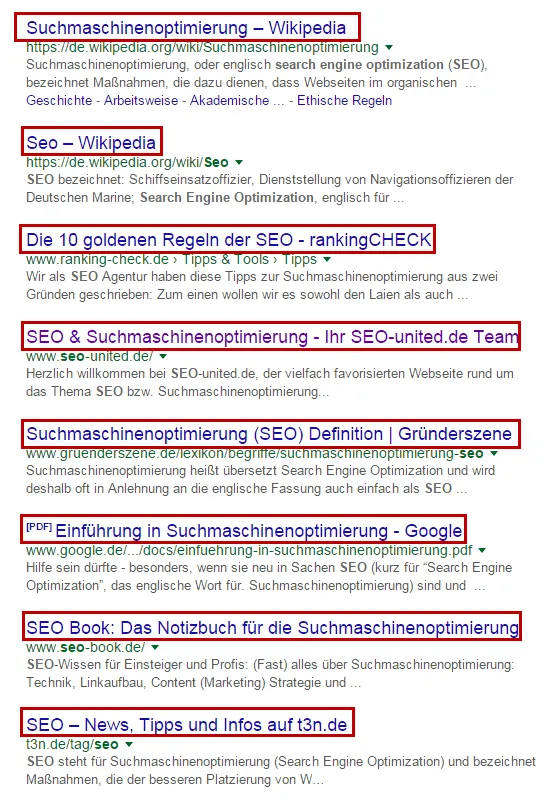
Other terms for the title tag can be:
- Page title
- Meta Title
- Meta title
- SEO title
- SEO Title
- SEO Page Title
AI answers and the title tag
In AI-powered search results and AI Overviews the title is sometimes prepared differently or linked as a source citation. A clear, precise title without clickbait increases the chance of being correctly recognized and linked as a source in such summaries. The same basic rules apply to classic SERPs and AI answers: unambiguous, on-topic, without superfluous additions.
Why are title tags important?
Title tags are important for search engines and user experience: Google evaluates the title as an important relevance signal, and for most users it is the first thing they see of the page.
- Search engines display the title in their results – so you have influence over how a page appears there.
- The title tag is shown to users in the tab in Firefox, Chrome, Safari, and Microsoft Edge.
- It also appears on social media such as Facebook or LinkedIn.
In addition to the evaluation by the search engines the click-through rate on a search result is also considered a relevant signal. With a good, compelling title, you can increase the CTR in the SERPs.
Google often displays the title on mobile devices with more characters or pixels than on the desktop, because the mobile layout is narrower but wraps taller. Since the majority of searches take place on mobile, it is worth checking the title in the desktop and mobile preview and always placing the most important information at the beginning.
What does the optimal title tag look like?
The ideal title tag is informative, makes people curious, and invites clicks. It should aptly summarize the content of the page and not raise false expectations (“clickbait”) – otherwise users are quickly gone again, which can harm rankings.
The optimal title…
- provides information about the page content and encourages clicks.
- avoids pointless lists of keywords (keyword spam).
- consists of 50–60 characters (from about 60–70 characters, truncation or rewriting looms).
- stays if possible under about 580 px (the length is calculated by pixels).
- is unique for every URL.
- places the relevant keyword in first position or at least far toward the front.
Typical mistakes you should avoid
Google truncates titles that are too long. What counts here is not the number of characters, but the number of pixels. The safest option is to keep the title under 60 characters. Colons and pipes (straight bar) save additional space.
Keyword stuffing, the pointless stringing together of many keywords, should be avoided. Google can penalize the pointless accumulation of keywords with a worse ranking.
Title ideas
- The keyword through which searchers are meant to reach the web page belongs at the front.
- The company name or the title of the blog can be included at the end and improve branding through its mention in the title.
- A call to action increases the likelihood of a click.
- A year emphasizes timeliness – but creates year-bound titles that have to be maintained annually.
- Lists with numbers (“4 tips…”) are clicked more often.
- Emojis (☎️ ✅) and special characters (✓ ➤) can additionally generate attention. However, Google does not display many of them in the search results.
- For shops, USPs such as “large selection,” “attractive discounts,” or “excellent” are especially click-strong.
The display frame commonly used today for the title is about 580 px on the desktop (around 60 characters) – not 600 px. Since Google calculates by pixel width, the number of characters varies depending on the letter width (a “W” needs more space than an “i”). Rule of thumb: stay under about 580 px or 50–60 characters and place the most important statement at the front.
Examples of title tags
Die Welt includes its name in the title and advertises with “News & Tipps” around the main keyword “Karriere”:

Numbers and lists make people curious and encourage them to click the URL. Healthy Habits promises 12 weight-loss tips:

A low price in the title can be enticing. Preis.de relies on a bargain price and integrates a call to action:

A proven pattern is “main keyword | secondary keyword | brand,” e.g., “Optimize Title Tag: Length & Examples – Farbentour.” Technically, the title stands as its own element in the <head>: <title>Optimize Title Tag: Length & Examples – Farbentour</title>.
Examples explained in detail
The chosen search word is “Katzenasthma.” In first place, “Das Futterhaus” appears:

The title tag has the right length and begins with the keyword “Katzenasthma.” Searchers learn that they will get “tierische Tipps” under the link and come across the shop name “Futterhaus.”
The website of R. Cegla GmbH & Co. KG, which sells medical aids, has the following title tag:

Here the title tag has the perfect length. The keyword “Katzenasthma” is in first place. The title does list the essential points in keyword form (causes, symptoms, therapy), but for medical topics this works without failing as “keyword spam.”
The online portal for veterinary assistants has, as an example, the following title tag:

Both the title tag and the meta description are cut off. The correct length was not observed here. The title begins with a medical, less common search term (“Asthma Bronchiale”) and only lists the important and common keywords at the end in parentheses (“felines Asthma, Katzenasthma”).
Checking the title tag
The title tag is checked manually by entering the corresponding search term into the search engine to see how Google displays it. The search engines reserve the right to adjust or change the title if, for various reasons, it does not fit.
With a SERP Snippet Generator you can check in advance how the title and meta description look in the SERPs.
FAQ: Frequently Asked Questions about Title Tags
Why are identical title tags harmful?
Search engines could evaluate identical title tags as duplicate content and then not know which URL should be served for the keyword. This can worsen rankings.
How can the title tag be optimized for the search engines?
The title tag should be a maximum of 60 characters long, make the user curious, and encourage them to click. The title tag should give an exciting summary of the content of the page and have the keyword for which the page is meant to be found as close to the beginning as possible.
Do special characters and emojis in the title tag do any good?
Special characters, such as emojis (☎️ ✅) and special characters (✓ ➤), can additionally increase attention and thus the CTR. Google reserves the right not to display them if too many are included. As a result, only very specific special characters are shown in the SERPs.
How do you adjust the title in WordPress?
With the free “Yoast SEO” plugin. Alternatives are Rank Math, All in One SEO, and other SEO plugins; many themes offer this option out of the box.
What does title rewrite mean?
Google rewrites title tags on its own (title rewrite). Since the title update in August/September 2021, Google regularly replaces the set <title> with one of its own. Studies (including by Zyppy) show that around 60 percent – sometimes over 75 percent – of titles are at least partially rewritten; Google itself states that in about 87 percent of cases it uses the set title. Particularly affected are titles that are too long, keyword stuffing, separator spam, or boilerplate. Anyone who keeps the title concise, unambiguous, and without filler characters increases the chance that Google displays it unchanged.
SEO & GEO check
Want more visibility – in search engines and AI answers?
We analyse your potential and show concrete next steps. Free and non-binding.