
On-Page & Technical SEO
The Dinosaur Among SEO Tools – How to Do “White Hat SEO” with Scrapebox


Today I want to introduce you to a real oldie among SEO tools.
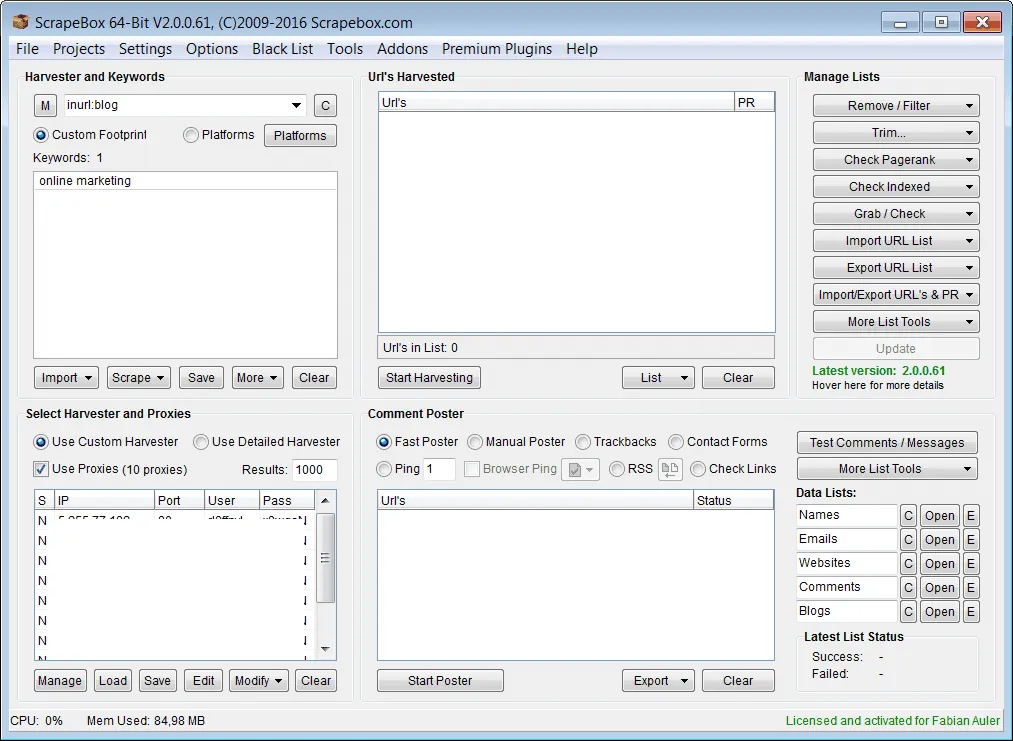
The tool in question here is Scrapebox. The program is installed locally on your computer and launched from there as well. Thanks to its many features, the tool makes daily work considerably easier. That's why anyone who runs websites and wants to optimize them for Google should take a closer look at this little tool.
On the official site, Scrapebox costs a one-time 97 USD, and via the following link you can save a few more dollars: scrapebox.com/bhw.
What Can Scrapebox Do?
For a long time, Scrapebox was used for various Back Hat techniques, such as automated blog comments and many other dirty spam techniques. The tool still has these capabilities, but I strongly advise everyone against them, because such techniques will very likely lead to a penalty (a heavy ranking loss for your website on Google).
So why do I recommend Scrapebox at all?
It's simple: Scrapebox can also be applied to White Hat SEO techniques & analyses — that is, optimizations that are accepted by Google (in general ;-)).
Scrapebox Harvester
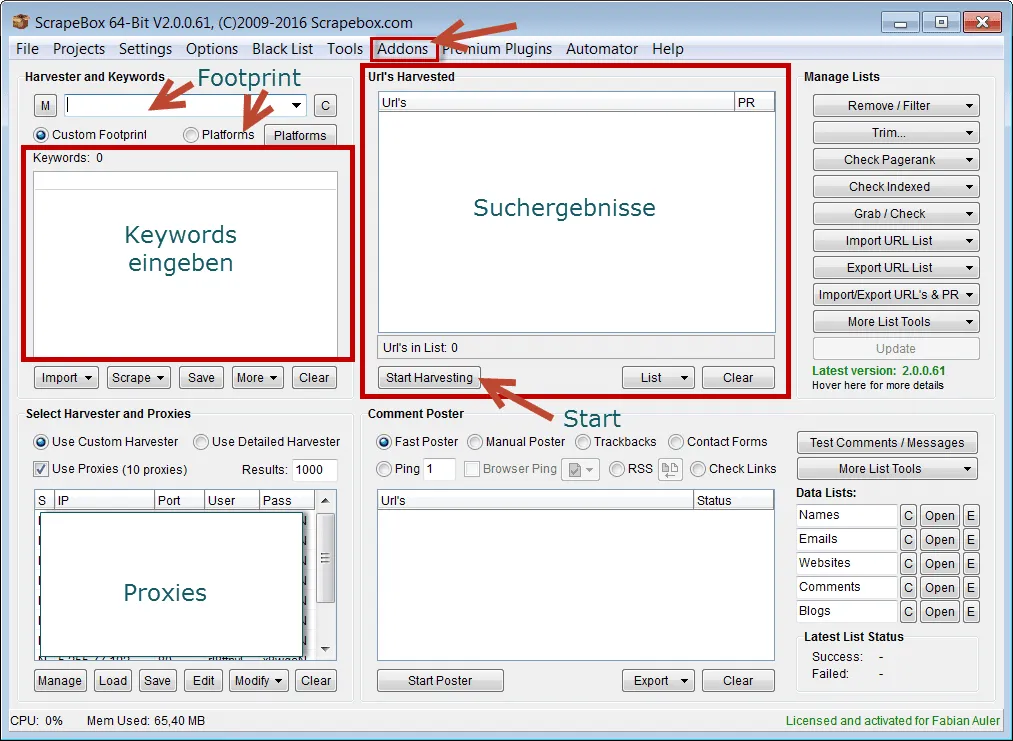
One of the most important features is the Harvester. “Harvest” means reaping and that already describes the function very well: with it, a large number of topically relevant link sources can be found and analyzed. That alone saves an enormous amount of time, since with manual link research on Google.de you would have to copy out every single search result by hand.
With the Scrapebox Harvester, you define through the entry of keywords and specific footprints which pages the tool should watch for on Google (and dozens of other search engines). Are only WordPress blogs being searched, for example? Or should only forums appear in the results? The possibilities here are very diverse.
Depending on the performance of your own PC, the results are presented in a handy results bar within a very short time. All search results can be edited, analyzed, or saved directly as an Excel list.
One alternative to this tool worth mentioning is Linkbird. That tool, however, charges a fixed monthly fee – whereas Scrapebox only costs a one-time payment.
Proxies
During its analyses, Scrapebox sends an immensely large data query to Google and the like. Search engines try to block such large data queries by blocking your IP address when you repeatedly request large amounts of data. To prevent this, you should disguise your IP address by using proxies. I can highly recommend the proxies from solidproxies.com and myprivateproxy.net (discount code “SCRAPEBOX”). It's important that you don't order shared proxies, since Google usually blocks these faster than private proxies that you use alone. The costs stay within reason here. For simple research and analyses, five to ten private proxies are generally completely sufficient (cost approx. 5 to 15 USD).
Add-Ons
The Scrapebox Harvester is just the beginning and serves solely for research. Through extensions (add-ons), you can add additional, mostly free features that let you edit and analyze the Harvester's search results.
The add-on “Broken Links Checker” finds broken links on other websites. This is excellent for applying the broken link building tactic. I'll explain exactly how it works in one of my next posts.
By means of a Moz API connection (which must be set up before use through a free registration at Moz.com ), Scrapebox can check Backlinks of websites and their Domain Authority. A mass PR (PageRank) query can also be run, but the question is whether the PR query still makes any sense at all, since Google hasn't updated the external PageRank in what feels like an eternity.
Also useful: with the tool you can find websites that Google has flagged as harmful pages (malware).
There are many more add-ons, such as the so-called Premium Add-Ons (Premium = one-time extra cost). Worth mentioning here is the RankTracker, with which you can query the rankings of any number of websites for specific keywords on Google, Bing, and Yahoo.
Conclusion
Sure, there are some other SEO tools that work similarly to Scrapebox, but the price and the many features of this little tool are simply unbeatable. Anyone who doesn't feel like spending hundreds of euros a month on certain SEO tools that often have the same features as Scrapebox should give this tool a chance.
One more clear note: anyone who uses Scrapebox for Black Hat techniques will very likely get their website kicked out of the Google index. That's why this tool should only be used for White Hat techniques.
That's why, in one of the next posts on Farbentour.de, I want to show you in detail how you can work with Scrapebox and, for example, quickly and easily find a large number of suitable link sources for your websites.
-Fabian
Save
Save
Save
Save
Need a GEO check?
Get in touch for more visibility – in search engines and AI answers.
- More visibility and leads via Google and AI chats
- Sustainable SEO & GEO strategies
- Personal support


