
What Is On-Page Optimization? Definition & Implementation
On-page optimization is part of search engine optimization and includes all optimization measures carried out on the website itself. Its counterpart is off-page optimization, which covers all measures outside the website, such as link building.

On-page optimization is divided into three major parts:
- technical,
- content-related, and
- structural adjustments.
The goal of on-page measures is to design the website so that search engines understand it as well as possible and so that the target audience finds it for relevant search terms.
Important Elements of On-Page Optimization
Optimization comprises technical measures (e.g., loading times), the creation of relevant content based on the search intent of keywords, and the adjustment of the information architecture. It therefore covers a broad range of individual measures.
A technical on-page building block in its own right are the Core Web Vitals. They measure the user experience using three values: Largest Contentful Paint (LCP) for the loading time of the largest visible element, Interaction to Next Paint (INP) for responsiveness (since March 2024 replacing FID), and Cumulative Layout Shift (CLS) for visual stability. As a confirmed page experience signal, they belong in every up-to-date on-page guide.
Optimizing Meta Tags
Meta tags allow you to give search engines initial information about the content on a website. There are various meta tags that carry different weight in optimization. The SEO-relevant meta tags include, among others:
- Title Tag / Meta Title
- Meta Description
Title Tag and Meta Description
The title specifies the page title of a web page (URL). The meta description is the accompanying description. Every URL should have a unique title and description; together they can be referred to as the SERP snippet. These are shown in the search engines' results.
The length of the title should not exceed 65 characters. If the title is too long, Google may only display it in truncated form. However, Google itself determines the length not by character count but by pixel width. The meta description should not exceed 200 characters.
The title and description are the first thing search engine visitors see of a website. They are, so to speak, your calling card in the search engines. That is why you should choose a title and description for each URL that encourages visitors to click. The AIDA principle has proven effective when creating good titles/descriptions that get clicked particularly often.
For the optimal title and description:
- Attention: The title should draw attention to itself.
- Interest: The title should spark the interest of search engine visitors.
- Desire: The wish to learn the information located on the website.
- Action: The visitor clicks on the web page in the search engine results.
An emotional appeal that highlights benefits makes for a good title and description that gets clicked often. What you should avoid is a pointless stringing together of keywords in the title.
- Place the main keyword, for which the URL should rank well, in the first position
- Not too many keywords, max. 2 keywords per title/description
- Include many USPs (unique selling points). A USP should always come after the keyword in the title and make a concrete statement, e.g., “more than 250 branches across Germany,” “large selection,” or “low prices”
- No empty advertising promises; don't disappoint the visitor
- Every URL should have a unique snippet
Example:
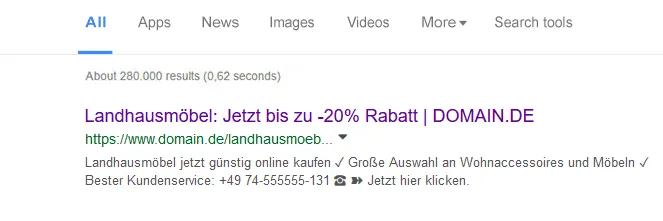
At https://www.sistrix.de/serp-snippet-generator/ you can test and perfect the title and description.
Meta Keywords
Meta keywords are not considered by Google. You should not invest any attention or effort in them.
Robots.txt
The robots.txt is a text file that lets you give search engine bots commands about the website, for example to not crawl and index certain areas. Errors here can jeopardize rankings if search engine crawlers are excluded by mistake.
The “disallow” command blocks certain paths of a website for the search engine bots.
In on-page optimization it is therefore important to check the robots.txt so that you do NOT exclude important search engines from indexing the website.
Structured Data (schema.org)
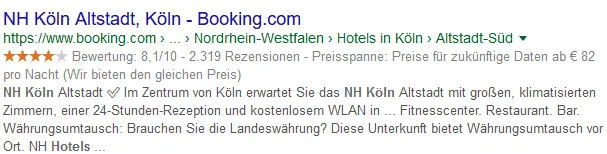
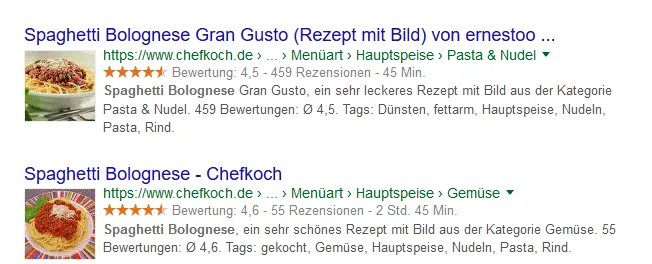
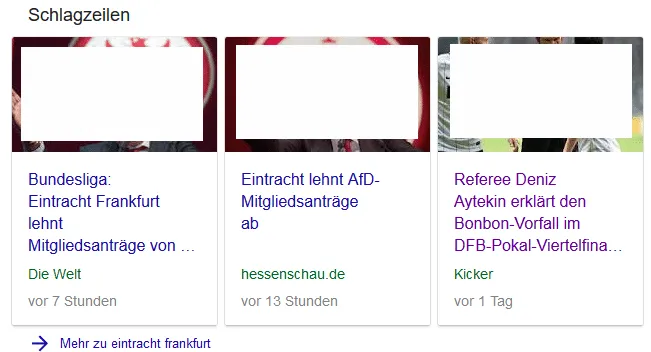
Structured data help search engines better understand information located on a website. With structured data you have the option to transmit additional information and have it displayed in the search engine results. Examples:
Events

Star ratings, price range
Recipes
News articles
Structured data can be implemented in various ways – for example via the Google Tag Manager.
Schema.org is a kind of translation for structured data with which you can transmit information. In order to use schema.org, a language is required, such as JSON-LD, so that it can be read by Google, for example. Not all search engines can fully read JSON-LD and do not display some information.
At https://validator.schema.org/ you can check whether the implemented data work correctly. Google has confirmed that structured data help them understand websites better, but that it is not a direct ranking factor.
XML Sitemap
An XML sitemap can be understood as a kind of table of contents for a website. It helps search engine crawlers better find and index all pages of a website. Via the Google Search Console you can enter the address of the sitemap to ensure that it is found. Most CMS systems offer plugins that create a sitemap automatically.
In WordPress, the Yoast SEO plugin or the Google XML Sitemaps plugin can take on this function. With the sitemap it is important to make sure that it contains only pages that are indexable and that no pages are included that are set to noindex OR that are blocked via robots.txt.
Particularly large websites (>10,000 URLs) should have a sitemap.xml and enter it in the Search Console. Each search engine sometimes has different requirements for sitemaps. Google can only process sitemaps with a max. of 50,000 URLs or a max. file size of 50 MB. Anything above that should be split into several sitemaps.
Content
Google is a full-text search engine. This means that the website's content has to make clear to the search engine which search terms it is relevant for – and relevant enough that the search engine places it as far forward as possible in the search results.
Creating Relevance: Keyword Density and TF*IDF Analysis
Keyword density and a term weighting analysis (WDF*IDF / TF*IDF) can help establish the relevance of an article for a keyword.
Keyword density is about mentioning the main keyword often enough in relation to the overall text. However, this technique is considered outdated – pure keyword repetition achieves little and, when overdone, can lead to ranking losses.
WDF*IDF shows which additional terms should be included alongside the keyword in order to be considered relevant (for “repair washing machine,” for example, “drum,” “repair service,” “pump”).

TF*IDF is viewed critically by some SEOs: in all likelihood, Google now assigns TF*IDF only little value, since these values are too easy to manipulate.
Instead of optimizing for the aforementioned keyword density and TF*IDF, content optimization should be geared exclusively toward the user. What is the user's search intent, what problems do they have, and what does the best solution look like?
Content Design
The structure of the text matters: most visitors scan texts and only then start reading. A plain wall of text without any structure is not enjoyable to read, and that is exactly what can have negative consequences for rankings. That is why the text has to be well designed and structured:
- Enough paragraphs; after about 4–6 lines comes a paragraph break
- Several subheadings, one H1 per page
- Bullet points, lists
- Bold formatting of important terms (don't overdo it)
- Visually highlight definitions and important statements
- Images, videos, tables and graphics and much more also make reading more pleasant
Meeting the Search Intent
For content to have a chance of being found well and delivering what the user is looking for, the search intent should be taken into account for every keyword. The search intent is the “search purpose” with which the user enters a term into the search engine. A distinction is made between various search purposes:
- Transactional keywords: These can be, for example, search terms with the addition “buy,” “order,” or “download.” Such queries can often also be commercial queries, especially for terms like “buy cheaper” or “buy online.”
- Informational keywords: Here the user searches for answers and solutions to their problems. So-called wh-questions are often informational, e.g., what to do about pimples?
- Brand keywords: Here the searcher enters the name of the company or the company's domain.
- Navigational keywords: Similar to brand keywords, here the searcher only looks for certain areas of a domain, e.g., Zalando customer service phone number. The domain is known, but not the specific subpage.
A good clue as to what is being searched for a given keyword is (simple but effective) to look at the top 10 on Google. Which results does the search engine display? This lets you quickly determine the search intent and adjust your own content.
The Panda Update
Google's Panda update (the first update appeared in February 2011) is an update that targets websites with low-quality content. Such websites are, for example, those that have very little text.
There is no minimum number of words here. As a rough guideline, I can give you a minimum of 500 words per URL. A text about Christopher Columbus should have significantly more words. A boring contact page with a contact form does not need 500 words. For webmasters, it is advisable to avoid the following points when creating text:
- Thin content (too little content/text)
- Content without added value, solutions, or entertainment for the reader
- Texts that are completely wrong in substance (do not spread untruths)
- Unreadable, plain walls of text
- Too many spelling and grammar mistakes
- Don't copy texts from others (see the duplicate content issue below)
Recommendations from Google
In a blog post on the Google Webmaster Blog by Danny Sullivan on 08/01/2019, it is explained which requirements content must meet to be regarded as high-quality content (and thus have the best possible chances of good rankings):
- The content must contain original information, reporting, research, or analysis
- The content should be a substantial, complete, or comprehensive description of the topic
- The content offers insightful analysis or interesting information that is not obvious
- If the content is based on other sources, you must avoid simply copying or rewriting those sources, and instead achieve substantial added value and originality
- The heading and the page title should provide a descriptive and helpful summary of the content
- The heading and the page title should not come across as exaggerated or shocking (keyword: clickbait) and mislead the user.
- The content must be so good that others voluntarily link to it and/or share it with their friends and recommend it.
- The content must be so good that it could also be found in magazines, encyclopedias, or books
But not only the content must be good; there must be clear trust signals that lead outsiders to conclude that the content is good, properly researched, and credible:
- Clear source references, evidence of the author's expertise, and background information about them (author box).
- The reader must be able to recognize that the author is acknowledged as an authority in their field.
- The content must come from an expert or enthusiast who demonstrably knows the topic well
- The content must be free of easily verifiable factual errors
- The reader must have so much trust in the author that they would gladly rely on this content even for questions about money or life (Your Money Your Life = YMYL websites). With the introduction of Google's E-A-T model for better classifying trustworthy content and websites, the trust signals listed are very important.
Trust signals must not only come from the author; the content itself must also be well presented on the website. Google gives the following recommendations for this:
- The content must be free of spelling or stylistic issues
- The content must be well produced and presented appealingly on the website accordingly. Sloppy or hasty mistakes indicate poor quality
- When the content seems as if it was mass-produced by a large number of authors and correspondingly little time was invested in the quality of the content
- The content must be quick to find and not be overlaid by excessive advertising or other disruptive elements.
- The content must also be easy to read on mobile devices
Finally, Google provides the following recommendations in the form of comparative questions:
- Compared to other pages in the search results, the content must provide substantial added informational value
- The text must not give the impression that over-optimization has taken place here just so that it ranks as well as possible in the search engines. The content should be written exclusively for the reader.
When optimizing texts, it makes sense to focus entirely on the visitors and to offer them real added value, entertainment, and problem-solving with the texts on the website. Google has become too smart, and it is not advisable to try any tricks.
Duplicate Content
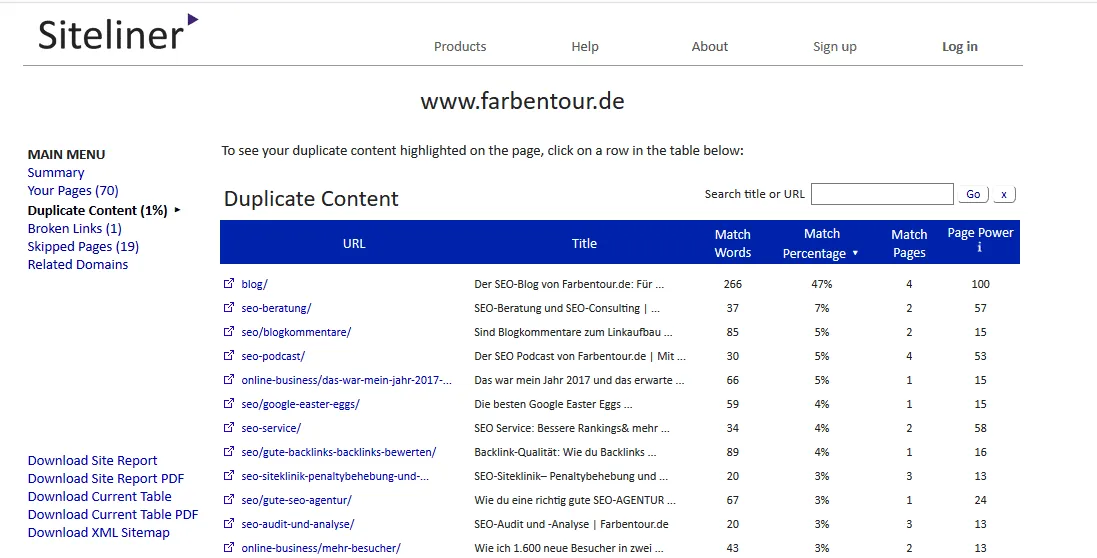
No content should exist twice or multiple times across different URLs. Something like that can be regarded as duplicate content and may under certain circumstances jeopardize rankings. That is why you should not publish content multiple times on different URLs or even copy other people's texts from other sources.
The biggest problem here for Google is recognizing which URL of the duplicate content is the relevant one. In some cases, none of the URLs then rank. Duplicate content is also a sign of poorly maintained websites, which likewise receive little trust from Google.
At http://www.siteliner.com/ you can check whether a website has duplicate content problems.

Index Management
The frequency and duration of crawling by the Googlebot is limited. This means that a content-poor website with many technical errors is indeed crawled less often than websites that are cleanly built and offer high value to their visitors.
Therefore, only relevant pages should be indexable and everything should be technically clean:
- – Content-poor pages, such as “We wish our customers a happy new year 2016” (or older), can be deleted. Even when the 10th employee is hired – turning that into a blog post of 20 words is seen as useless by Google and most readers. Rule of thumb: for all pages that, according to keyword research, have no search volume and thus fulfill no search intent, you should check whether they are better deleted.
- – Pages that have no search intent but cannot be deleted, such as the legal notice, a contact page, etc., should be set to noindex,follow. Google then immediately knows that such pages are not relevant for its search index.
- – Pages with filter functions: online shops in particular often have pages with countless filter variants and thus a significantly higher number of URLs. To ensure that Google always indexes the correct URLs, the so-called Post/Redirect/Get pattern helps. With this method, the Googlebot reads significantly fewer URLs than when pages are marked with canonical tags or noindex,follow attributes. For large sites with a particularly high number of URLs that are, for example, generated dynamically, this helps enormously to save crawl budget.
- – Broken links – pages with links to pages that no longer exist (whether internal or external) should be fixed. Such errors can quickly make clean crawling by the crawlers more difficult.
- – All URLs of a website should have a clean status code (200). Other status codes such as a 404 error (page not found) should be avoided..
- – Internal links can be very decisive in on-page optimization. Link to important pages for which you want to rank well as frequently and prominently as possible on the website, e.g., in the menu, regularly in the body text, etc. Everything else about internal links you'll find here on the SEO blog.
- Delete everything that has no search intent and is not needed!
- Set URLs that cannot be deleted, such as the contact page, legal notice, privacy policy, etc., to noindex,follow
- Internal links: broken links disrupt crawlability (outgoing and internal)
- Check and fix crawl errors via the Google Search Console
- The status codes of all URLs should be 200 (no 4xx, 5xx)
- Avoid internal redirects and redirect loops
- Page-level distribution / site architecture: with how many clicks do visitors reach a certain URL? The more important the URL, the fewer clicks it should take
Forbidden Tricks:
Using forbidden techniques, also known as black hat SEO tricks, in on-page optimization involves enormous risk and should no longer be used:
- Tricks that used to work, such as the frequent/intrusive repetition of keywords (keyword spam), lead to a Google penalty.
- Misleading the user and the search engine, for example through hidden content (white text on a white background), is likewise to be avoided.
- Doorway pages and other black hat SEO tricks that try to fool the search engine crawler should be avoided, as they are recognized by Google sooner or later.
FAQ: Frequently Asked Questions About On-Page Optimization
Here are the answers to frequently asked questions about on-page optimization.
Which CMS (content management system) does Google prefer?
- Google does not prefer any particular CMS.
JavaScript and SEO – can that work?
- Search engines still find it difficult to read JavaScript correctly. I cannot recommend JavaScript websites if you want to achieve as much traffic as possible via search engines with such a website.
Does SSL / HTTPS encryption have advantages?
- Encrypting a website with a security certificate sends an additional trust signal to users and machines. Since the free SSL certificate “Let's Encrypt” has been available, no webmaster should do without it anymore.
Is the text/code ratio a ranking factor?
- The text/code ratio expresses how much text there is in relation to the code (page source) on a page. There are sources that claim that too much code relative to text is a negative ranking factor. I cannot confirm this. Considering that video pages and other very code-heavy websites can also have good rankings, the text/code ratio can be disregarded.
What to do with a website that has multiple languages?
- If there are different language versions on your website, you have to mark up this language using the attributes rel=“alternate” hreflang=“x”. In addition, you can register the language versions via the Search Console.
Subdomain vs. directory – which makes more sense?
- A directory is always preferable to a subdomain, since subdomains are treated like a standalone website.
Too many errors in the page source – is that bad?
- The page source should be error-free. Minor errors are not bad, but several hundred errors can have a negative impact.
Is the mobile display important?
- If you don't have a website optimized for mobile devices, the train left the station years ago… In times of mobile first, websites today should be optimized for mobile devices such as phones or tablets! More and more users go online via such devices and sit in front of the desktop PC less. With the introduction of the mobile-first index, Google has clearly shown that every website should be optimized for mobile devices.
SEO & GEO check
Want more visibility – in search engines and AI answers?
We analyse your potential and show concrete next steps. Free and non-binding.