
Internal Linking and Internal Links Explained
Internal links are links, also called hyperlinks, that point within a website (domain) to another subpage or resource, such as a PDF document or an image.
These links are intended to help visitors and search engines orient themselves more easily on the website and be guided to further, important information. The optimization of the internal link structure is an important part of search engine optimization.
A distinction is made between internal and external links. External links are also simply called backlinks and refer to links from one domain to another (website A links to website B).
Why Internal Links Are Important
With the help of internal links, the link power of a website is passed on to various subpages. This is how visitors and Google recognize which pages are particularly important. The formerly common term “link juice” as a pure PageRank-flow metaphor is now considered outdated; more current usage speaks of internal relevance and authority signals.
How Internal Links Improve Usability
Internal links can be found, for example, in the menu, in the content (body text), in the footer, or in the sidebar of a website. It is important to design the internal linking in such a way that visitors reach relevant information quickly enough. If the links on the page are confusing or do not lead to the desired destination, visitors lose track and quickly leave again to find information elsewhere.
It is also important to link internally with clear link texts. Unlike external links (backlinks), internal links should be linked with explicit texts in order to make it immediately clear to visitors, but also to Google, what the internally linked page is actually about. So do not link internally with meaningless terms like “here,” but with descriptive, thematically fitting anchor texts.
Designing a Website’s Information Architecture Correctly
Internal links therefore serve as anchor points and pathways on your own website. So think carefully about which information architecture you want to create for your website. Important categories and pages for which you want to achieve rankings should, for example, be quickly reachable with just one or two clicks from the homepage. Since every website has different goals, unfortunately I can only give general tips here ;-)
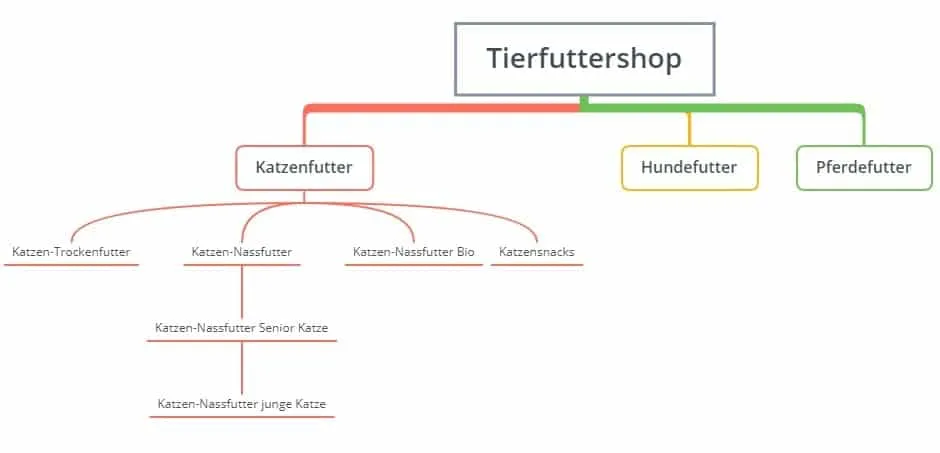
In the image above, you can see a small example of a sensible information architecture through internal linking on a website. From the homepage, the pages “Cat Toy Test” and the blog can be selected with one click. In addition, a recent blog post on the topic of “Keeping Cats Occupied” links to the “Cat Toy Test” page. This way, the reader of the blog post is guided to relevant content on the site.
Orphan pages are subpages without a single incoming internal link. Google does not find them through normal navigation, they receive no internal link power, and they are often not indexed at all or only poorly. Therefore, check regularly whether every important page is linked from at least one thematically fitting page, and deliberately connect orphan pages via overview, category, or content pages.
Internal Linking in Search Engine Optimization
From an SEO perspective, internal linking serves to pass on the link power that a website receives through its backlinks to the most important subpages. Since backlinks are still an important ranking factor, the link power on your own website should be distributed as well as possible. The deeper a subpage is hidden, the weaker the link power often becomes.
Example:
You have a website with strong links on the homepage. If you link important product pages directly from the homepage, they receive significantly more link power (and thus better ranking chances) than if they are only reachable via several clicks.
However, the link power of each internal link is weakened if you place too many links on one page. There is no specific number; it varies from website to website. Very large, authoritative portals can also carry a high number of internal links per page because they have correspondingly high link power – for a small blog, on the other hand, significantly fewer make sense.
One tip for giving link power to many important pages is overview pages, on which you link all pages relevant to a topic. On such pages, the most important links on a topic can be collected and deliberately strengthened with internal link power. Do not link externally there and not to irrelevant subpages.
Google generally gives links in the sidebar or menu more weight than footer links. Keep the information architecture as flat as possible so that important pages are reachable with few clicks.
Content Links – Powerful Tools for Optimizing Internal Links
Content links are links in the body text of a page. Over the years, these have gained more and more weight from Google – both external and internal links in the body text. Therefore, be sure to also use internal links in the content on your website.
Here, too, link with proper terms (money keywords) and not with meaningless terms like “here” or similar… Take a look at the links in the body text on Wikipedia.org – that’s exactly how it’s done!
With links in the body text, you can offer your readers additional information and guide them meaningfully through your website. It is important that the internal links are placed sensibly and are not “forced.”
Do not link different pages with the same anchor text – this could lead to confusion for your readers, but also for the search engine.
But do not overdo it with internal links: the more internal links are placed on a page, the less link power is passed on.
Two internal links per 500 words of body text are perfectly sufficient – a little less, or, if it fits, a little more, is fine too. There is no rule here; instead, you have to decide for yourself whether the text contains a term worth linking. Nothing, however, is worse than the compulsive attempt to squeeze random terms into your texts just to link. Link internally when it makes sense and the pages fit together thematically.
Siloing: Optimizing the Internal Link Structure
In the SEO industry, internal linking often involves discussion of the siloing of internal links. Particularly large sites benefit from this linking strategy.
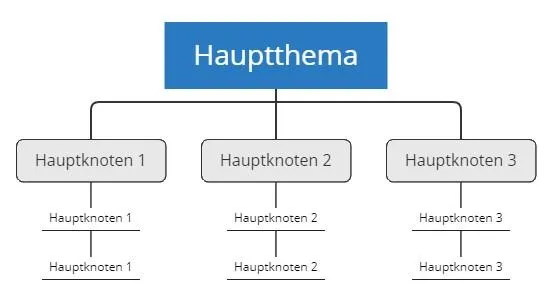
With “siloing,” only thematically matching topics are linked internally. If there are several categories on a website, internal links are never made to different categories/topics. The internal links are only made within the category/topic.
This strategy has several advantages:
The user is not distracted by other topics and stays on the topic until the desired conversion is triggered. This also makes it easier for Google to keep topic areas apart. In addition, through this strategy the page can build up authority on the topic.
As a rule of thumb (the 3-click rule), every important page should be reachable in a maximum of three clicks from the homepage. A low click depth ensures that Google crawls the pages efficiently and that the internal link power reaches them well.
Breadcrumbs (e.g., Home > Category > Post) are a standard element of internal linking. They give users and Google the page hierarchy as an additional signal and can be marked up using the BreadcrumbList schema (schema.org), so that Google displays the path directly in the search results.
Today’s standard model is the pillar page (a comprehensive main page on an overarching topic), which links to several cluster articles on sub-aspects – and the clusters link to the pillar and, where appropriate, to each other. This is the modern evolution of classic siloing: thematically self-contained, but more strongly oriented toward a central hub page.
10 Important Points to Consider for Internal Linking
- With internal linking, different internal link destinations should never be linked with the same anchor text.
- More is not always better with internal linking: never link to the same link destination multiple times on one page – this only dilutes the link power and does not strengthen the multiply linked page.
- Too many internal links on one page dilute the link power too much and thus also their effect. However, there is no recommended number of links – rather, ask yourself whether every internal link you place is sensible or not.
- If you rank on Google for certain keywords with several pages at the same time in the search results, correctly placed internal links can help (prioritize!). Therefore, do not link several pages internally with the exact same keyword. Avoid linking subcategories more strongly than important top-level categories.
- Never link internally with nofollow – it usually makes no sense to give internal links a nofollow attribute, because this means no more link power is passed on. Passing on link power is, after all, your goal.
- Internal links should never link to 404 error pages, as valuable link power is otherwise lost.
- Be careful with redirects: always link internally directly to the final URL to avoid unnecessary redirect chains. (301, 302, and 307 redirects pass on PageRank – the assumption that “302 does not pass on PageRank” is a myth.)
- Never link with “here” or other meaningless terms. Use descriptive, varied anchor texts instead of rigidly exact money-keyword anchors: while there is no dedicated over-optimization penalty specifically for internal links, purely exact keyword anchors can lead to cannibalization and unclear relevance signals.
- Caution is advised when automating internal linking, as is possible, for example, in WordPress via plugins. Here, far too many internal links are often placed and faulty distributions are not checked. A well-thought-out, manually maintained link structure is therefore more important than a particular tool.
- Various tools help with the analysis: a crawler like Screaming Frog finds orphan pages and excessive click depth, the Links report in the Google Search Console shows the most-linked internal pages and the anchor texts used, and tools like Seobility supplement the evaluation of internal link distribution.
Quellen
SEO & GEO check
Want more visibility – in search engines and AI answers?
We analyse your potential and show concrete next steps. Free and non-binding.