
SEO Basics & Strategy
17 SEO Tips on How to Successfully Optimize Websites for Search Engines

Are you looking for SEO tips and tricks for your website?
Then you've come to the right place!
In this article I want to introduce you to 17 SEO tips that you can use to optimize your website for the search engines and thereby generate better rankings and more visitors.
Your website is online, but not finished yet?
Many CMS systems such as WordPress give you the option of preventing your site from being indexed by the search engine bots. For example, if you've created a completely new site in WordPress and don't yet want Google to index your “unfinished” website, you can go to Settings -> Reading -> “Discourage search engines from indexing this site” and check the box.
If you want to manually lock the Google bot out of your website for now, you can enter this in the Robots.txt file on your FTP server (main directory / root):
User-Agent: Googlebot
Disallow: /
In most cases, this prevents the content on your still-virgin site — often automatically generated by WordPress (the “Hello World” post, an awkward permalink structure or the “Uncategorized” category) — from being indexed by Google. You also avoid a “404 not found” error page showing up in Google Webmaster Tools (now Search Console) when you delete this automatically generated content.
[Know-it-all mode on]As soon as you've set up your site and want Google to index it, you naturally have to remove the entry in the Robots.txt file. [/Know-it-all mode off].
Install an “SEO” Plugin
Many CMS systems offer so-called SEO plugins. These let you configure settings for optimization; for example, you can set individual pages to “noindex,” manage titles and so on.
For projects based on WordPress, I've been using the plugin Yoast SEO Plugin by Joost de Valk for years now. Here you have countless options for optimizing your blog for the search engines: title and meta description settings, setting canonical tags as well as small SEO tips help you optimize your posts and much more. The tool also offers an XML sitemap. Personally I find it a bit clunky and unattractive — so I recommend installing the plugin by Arne Brachhold (Google XML Sitemaps) instead.
- Don't forget to submit your XML sitemap in the Search Console
Of course you can argue about the point and purpose of such SEO plugins, and many settings can be entered directly “by hand” into the source code. Still, I can often recommend such plugins, since they are a great help especially for beginners and make the work easier.
Use “nofollow” on Outgoing Links Only Very Selectively
Since webmasters who built up a disproportionately large number of outgoing links to topically irrelevant websites were often penalized by Google in the past (ranging from a downgrade all the way to removal from the search results), you should be careful with outgoing links on your site and rather mark off-topic linked websites with “nofollow.”
If you link to topically relevant websites that offer your readers added value, that's of course in line with Google's wishes — these should by no means be marked as “nofollow.” So don't start setting all outgoing links on your blog to “nofollow.”
It's a different story if you take money for placing links to specified link sources. Google strongly recommends that in such cases you set these purchased, unnatural links to rel=“nofollow” and label the article as “advertising.”
With the “NoFollow” attribute you tell the search engine not to evaluate the link. This way you can protect yourself, or rather your site, from a penalty due to link manipulation.
Avoid Duplicate Content
Duplicate content can be a sign of poor quality on your site for Google or, even worse, you end up competing with yourself for your search terms.
So avoid copying content from other sources on the internet (if only because of copyright law) and avoid publishing content multiple times on your website.
Many CMS systems give you the option of creating categories and tags. If the labels of individual categories overlap with tags, this can likewise already create duplicate content.
Example:
On your site there is a category named “Red Cat.” If you now also create a tag with the label “Red Cat,” you generate duplicate content and duplicate titles, since there are no different labels for tags and categories. To avoid this problem entirely, you can set categories and/or tags to “Noindex” in CMS systems.
With the tools Siteliner.com or Screaming Frog you can analyze your site for duplicate content. You can find more SEO Tools here.
Improve Loading Speed
Pay attention to your website's loading times.
Reduce the amount of data the server has to load in order to make your page appear in the browser. So always compress your website's images before you upload them. With Tinyjpg.com you can compress images in advance and thus reduce your images' storage requirements without any loss of quality.
Here you'll find countless more tips for optimizing loading times: http://www.torbenleuschner.de/blog/730/pagespeed-so-machst-du-deine-website-schneller/
You can forget about any optimization of your website if you've cut corners on web hosting (“false economy”).
So host your website with a good provider that has good/fast servers. I host my own blog on Pure-Host. But there are still many other very good hosting providers such as All-Inkl.
You can check the loading times and optimization needs on Webpagetest.org.
Block Spam Comments
Many blogs and forums where visitors can discuss things often have a problem with spam. Comments that link to dubious content, or just pointless comments such as “Thanks for the post – Buy cheap pet food here now [LINK],” should not be published on your blog, because otherwise Google might view your site as a SPAM website / link farm, and you'll then hardly have any chance of good rankings …
Even if the links in the comments are set to “NoFollow” in many CMS systems like WordPress, you should stop pointless spamming on your blog and delete such comments.
Image SEO
If you want to get more traffic via Google, you should also optimize the images on your blog for search.
The image's alt text is very important for readers and search engines. Before you publish an image, you should also set an alt text.
There are considerably more ways to optimize your images. You can find more info on Image SEO here.
Link From New Posts to Old Articles of Yours
Internal linking has become very important for a good ranking. Link within the running text of your posts to your most important pages so that they receive as much link power as possible.
When doing so, don't link to different pages using the same link text, because that could confuse Google.
Link to Your Most Important Pages Especially Often
Do you want to push certain content especially hard in order to achieve the best possible rankings?
Then you should try to link to it prominently — whether in the menu or in the sidebar. Internal linking within the content is also important (see the previous point). Such internal links push your website's rankings as well.
Example:
I have the most popular posts on Farbentour.de appear in the sidebar, so that the most important posts are also always prominently linked across the entire site.
In addition, with every new post I try to place internal links within the running text to fitting pages — for example to our link building agency or my post about finding a good SEO agency I try to link more often.
Attention WordPress solo warriors: Set the Author Archive to “noindex”
Do you use WordPress for your website and are the only author of your website? Then it makes sense to set the author archive to “NoIndex” in order to prevent duplicate content.
If you don't do this, the author archive has the same content as your domain, on which your posts are published.
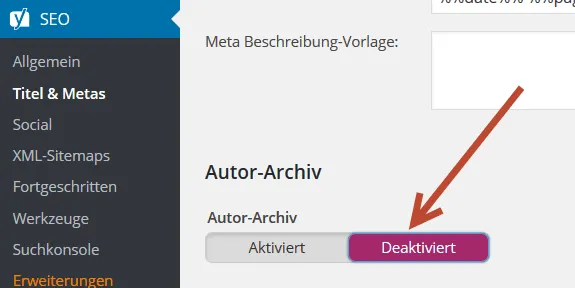
Using the WordPress SEO plugin Yoast you can disable the author archive under Settings -> Title & Metas, or at least set it to “noindex.”
In our article about WordPress SEO you'll learn everything you need to optimize your website for the search engines.
Be careful with free (WordPress) themes: Use a good (and paid) theme for your website
Of course there are also good free WordPress themes.
So why use a paid theme?
With many free themes you never know whether a hobby developer was at work here or a real pro gave free rein to their skills.
Free themes are often error-prone, receive updates less frequently and can contain security vulnerabilities. Do you want to expose yourself to this risk?
Paid themes are in many cases better programmed, often get good support, are continuously developed further and have many other advantages.
Of course paid themes can also have weaknesses, and before you spend some sum X, you should inform yourself precisely about which WordPress theme you need for which purpose.
I recommend the Genesis Framework: This framework regularly receives new stylish child themes for almost every need, has a great support forum, fast loading times and lean programming. In addition, the theme can quickly be adapted to your own needs and is constantly developed further. On top of that, new and modern child themes are available for free download at regular intervals.
Mobile Responsive Design
I wanted to fold this point into the previous one, but mobile responsive is so important that I want to treat it as a separate point.
Your website must have a mobile responsive design!
More and more people now surf the web with tablets and phones. If your website is not mobile responsive — that is, if your website doesn't adapt to the screen format of mobile devices — you'll very quickly lose a lot of visitors this way. This topic is also becoming increasingly important for Google and could sooner or later become an important ranking factor.
Here you can check how your site looks on mobile devices.
Use the Power of Good Headlines!
Good headlines attract visitors like magic and encourage them to click on your posts and read them.
By good headlines I of course don't mean pointless clickbait like:
“When the fishermen saw what they had caught in their fishing net, their breath caught. But wait, watch what happens at 2:20”
… 90 percent of all internet users (I hope at least) no longer fall for silly headlines of this kind.
No, good headlines are, for example, “How you”-headlines (How you get your first 10,000 visitors to your blog) or “List Post”-headlines (12 simple steps in on-page optimization). More on the topic of headlines you can find here from the headline god himself.
Don't forget to build the keyword that the respective page should rank for on Google into the headline. Google is admittedly getting better and better at understanding texts (synonyms), but an article still has better chances of ranking if the keyword can be found in the headline.
Don't Forget the On-Page SEO Basics!
Even though it has already been rehashed very often on Farbentour.de and on other blogs:
You should always maintain your title and meta description. Here, too, definitely build in the keywords that the page/post should rank for.
However, you shouldn't just write a loose string of different keywords — the whole thing should actually make sense. ;-)
How to improve your meta title you can find out here on the blog.
Maintain Your Social Media Profiles
Via social media channels such as Twitter, Facebook and so on, you can generate a lot of free traffic. So maintain these channels regularly by filling them with new content.
You can also attract more visitors to your website through topically relevant groups. On Facebook you do this via Search -> Your keyword -> Groups in order to find suitable groups in which you can place a link to your website.
Of course without spamming the group members to death!
Take part in discussions beforehand and ask the admin whether you may present your website in the group. Anything else is not looked upon so kindly. You'll be branded a spammer and, in the worst case, thrown out of the group.
If you get additional traffic through other channels outside of Google, this can theoretically be a positive signal to the search engine that your site is relevant and important.
Fix Broken Links on Your Blog
With the Broken Link Checker add-on for Chrome you can scan your site for “broken” links.
Outgoing links that point to “dead” or no-longer-existing pages — because, for example, the webmaster deleted the content or the old URL isn't properly redirected to the new one — are annoying for the visitor and also for Google, and don't exactly indicate that the content on your site is regularly maintained.
So definitely avoid broken links on your site.
The Content on Your Site Is the Most Important Thing
Over the years, Google has focused more and more on the content of websites. The algorithm updates Google Panda and Google Penguin have moreover harshly penalized content-poor websites and link farms.
So what's left?
That's right! Good content for your target audience!
So concentrate on providing good texts, videos, podcasts and other interesting content for your readers. Your visitors and Google will love you for it and reward you with good rankings!
Conclusion
Getting a website to the top of Google's search results is often hard work — but the work pays off sooner or later.
Don't blindly trust tips; instead, test out a lot yourself in order to really get everything out of your pages. Work a lot on your content and offer your readers something special.
There are no quick wins (keyword: get rich quick). If you really want to generate a lot of traffic over the long term via Google and Co., you also have to do a lot for it.
Over time, every webmaster also gains experience and learns from their mistakes!
Oh no, did I write mistakes?
Yes, you read that right. Everyone makes mistakes (me too :-)). Mistakes are important and often you only learn an enormous amount from mistakes. Be willing to make mistakes. :-)
I wish you much success in optimizing your website.
-Fabian
Need a GEO check?
Get in touch for more visibility – in search engines and AI answers.
- More visibility and leads via Google and AI chats
- Sustainable SEO & GEO strategies
- Personal support


