
SEO Basics & Strategy
WordPress SEO Tutorial
How to Get Your WordPress Website to the Top

WordPress is a popular content management system (CMS). It is so easy to handle that beautiful websites can be created even without any programming knowledge.
But how do you optimize WordPress websites for search engines?
To keep track of everything during optimization, we have based this WordPress SEO guide on the three main tasks of a search engine:
- Crawling
- Indexing
- Relevance
If the search engines can flawlessly crawl, index your website without any obstacles and also recognize a high relevance for your desired keywords, you can achieve really good rankings.
You will learn how to do this in this article.
WordPress SEO Video
Don't feel like reading? No problem – then watch our WordPress SEO tutorial. We show you how to optimize your site step by step.
WordPress SEO tutorial – how to get your website to the top:
WordPress SEO: Improving Crawling and Indexing
The so-called search engine crawlers read your website and decide whether your page should end up in their search engine index or not. For Google & co. to be able to flawlessly crawl (read) and index (include in their search results) your website, it must be free of errors and easily accessible for the crawlers.
With the following points, you can create a barrier-free website for the search engines.
The Right Host for WordPress SEO
The basic framework is, of course, the host of your website. When it comes to hosting, therefore rely on good and high-performance providers that cost a few euros more but let your website load significantly faster, offer more security, and have good support. This way, you build your website's SEO success on a solid foundation.
What should a host that is good for SEO and for WordPress have?
- SSL (optional: Let´s Encrypt)
- HTTP/2
- Server location in Germany (or in the country where you want to rank)
- Content Delivery Network (CDN) if you want to rank internationally
- 99.9999% uptime
- Enough SSD storage for your website (2 GB is often far too little)
- Hosting optimized for WordPress
- Already integrated caching
- Up-to-date PHP version
- Security packages
- Regular backups
- 24/7 German technical support
Our Recommendations
Over the years, we have had the best experiences with these hosts:
- Pure-Host (24/7 support, top performance on WordPress-optimized servers, very good value for money, CDN included)
- Raidboxes (top performance and good support)
- TimmeHosting (top performance for WordPress, good support, good value for money)
- All Inkl (good performance for smaller WordPress sites, good support)
- Hetzner (good performance and support)
Choosing a host is a bit of a holy war – try not to save too much here, as particularly cheap providers often deliver poorer performance.
Theme
With the right WordPress theme, you can already take an important first step in optimization.
The theme you use should be mobile responsive, optimized for loading times, and have a capable support and development team that releases regular updates and makes sure the theme runs with the latest WordPress version.
Many free themes don't have this! That's why we recommend always falling back on the well-known and paid themes. These are usually already very well optimized, have lean code, are optimized for loading times, and have a capable development team.
Important: Check your theme with https://validator.w3.org/ for possible HTML errors. If there are many errors here, it can be an indication that this theme was sloppily programmed. But don't panic: A few errors are normal and do not harm your Google ranking.
A few recommendations from us:
Of course, the free standard themes that come with every WordPress installation are also perfectly fine. The bestsellers on common platforms like Themeforest are usually very good, too. Only free themes repeatedly leave something to be desired, due to poor programming and non-existent support.
Allow Crawling
The first and most important point: Are the search engines allowed to read your website and include it in their search index?
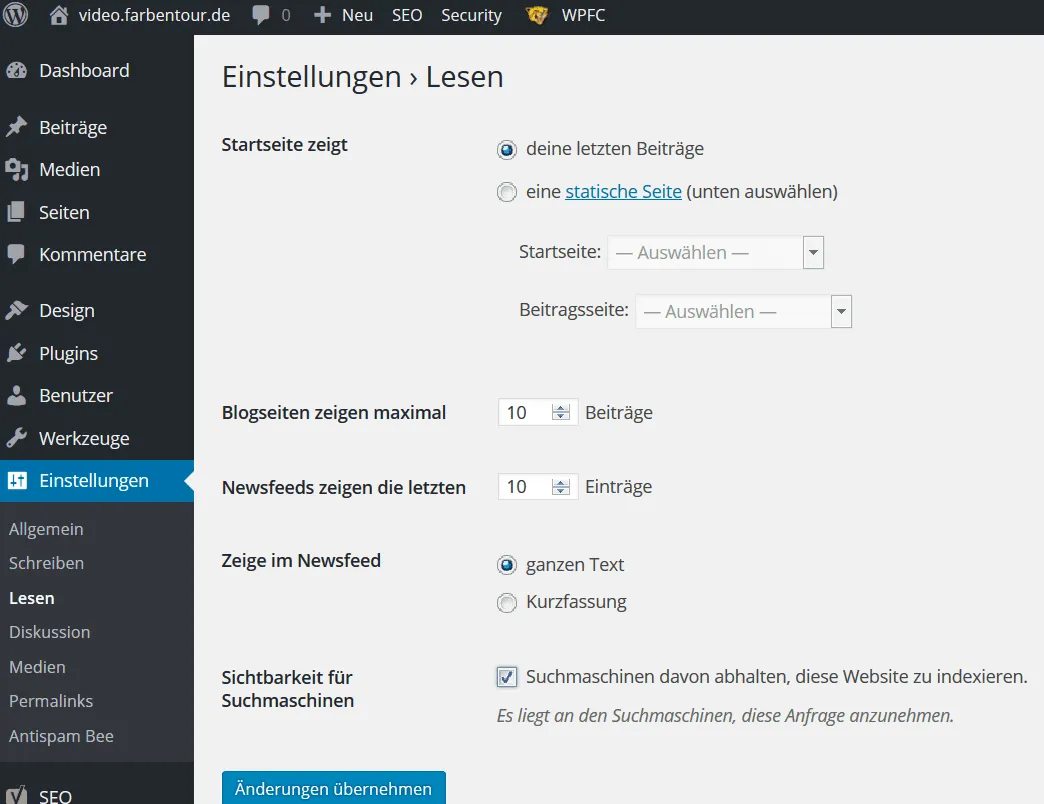
In the settings in the backend of your WordPress website, under “Reading”, you should check whether a box has been ticked at “Discourage search engines from indexing this site”. If a box has actually been ticked here, you should scream and pound your house wall a few times, as this is the biggest mistake of all. If the search engine cannot index your WordPress website, it will logically not be listed in the search results either. You can also simply run a site: query (example: site:your-domain.de/subpage) to check whether your website or its subpages have been indexed.
Google Search Console
Register your website in the Google Search Console in order to receive direct information from Google. This way, you can check whether your website can be indexed flawlessly or whether Google reports errors. You are also shown how many visitors you receive through the organic search results. Furthermore, you can submit an XML sitemap and analyze why certain subpages may not have been indexed.
Via the Console, you can also speed up the indexing of your website. To do this, enter the respective URL in the search bar and then click on “Request indexing”.

The best part: The Google Search Console is absolutely free.
Tip: Pay attention to your robots.txt file. You need to critically question “disallow” commands in particular – it's easy to accidentally lock out half of your website from the Googlebot here. Here is a little helper tool for that.
URL Structure
The URL structure is not a direct ranking factor. However, short and meaningful URLs can be better understood by Google and your visitors.
If you have set up a fresh WordPress blog, it is advisable to always choose the “Post name” option as the permalink. This keeps the URL as short and understandable as possible at the same time. If you want, you can also use a custom URL. On Farbentour.de, for example, we used to use the following URL structure: “/%category%/%postname%/”. This way, the category and the post name are shown in the URL.

For larger blogs that publish news hourly or daily, it can make sense to select “Day + name”.
Warning: If you have been running a WordPress blog for a while and have already achieved a few good rankings with it, you should be careful about changing the permalinks after the fact.
If you change the URL structure, the URLs of all already published posts will change too. If you then don't set up any redirects (e.g. with a Redirection plugin), the old URLs will lead nowhere, which can potentially result in ranking losses.
WordPress SEO Plugins and Settings
With a good WordPress SEO plugin, you can optimize your WordPress website further.
The free plugin Yoast SEO is rightly one of the most popular SEO plugins for WordPress. Here, some important settings can be made with just a few clicks.
Menu item 1: General
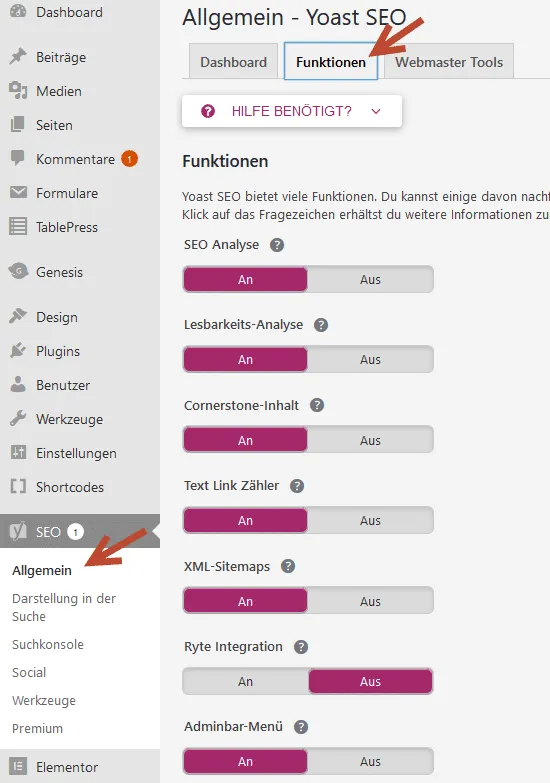
Under “Features” in the “General” section, you can enable and disable various features of Yoast SEO. It is important here that the “XML sitemap” feature is enabled. A sitemap serves to better index your website through the search engines.
You can also submit the sitemap in the Google Search Console, which we already mentioned, under “Sitemaps”.

Tip: In this video, we explain the configuration of Yoast SEO using a practical example
Menu item 2: Search Appearance
General:
In the “General” item under “Search Appearance”, the meta tags (title tags, meta description) for the homepage of your website can be adjusted. If you leave these fields blank, Google will compile the meta tags in the search results itself, which may be incorrect. Therefore, it is advisable to adjust these yourself.
Content Types
The default settings can usually be kept as they are here, since this is where the indexing of posts and pages is controlled.
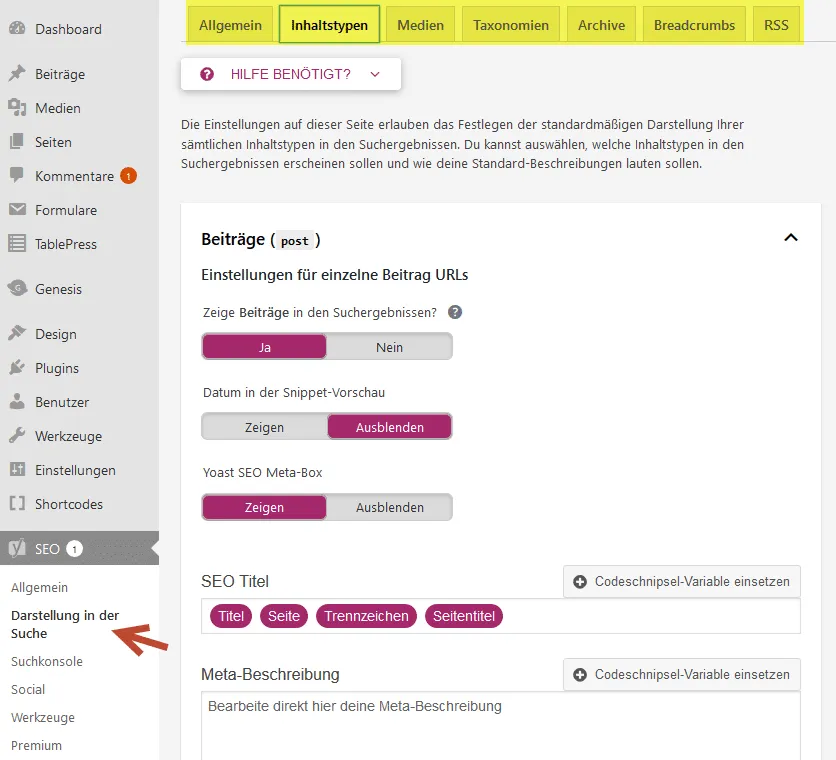
Important: Here, too, the title tag (SEO title) can be set for all page types. In the example image, Yoast SEO automatically generates a separate title tag from the posts' “Title / Page / Separator / Page title”. However, it is advisable to always revise this manually. The title tag is an important and direct ranking factor and should therefore be optimized properly.
The title should not be longer than 55 characters and the description not longer than 150 characters (including spaces). The title should contain the respective keyword that you are optimizing the respective URL for. Even more tips on creating titles and descriptions can be found here on our blog.
Media
Under the “Media” tab, the display should always be set to “Yes”, otherwise every image gets its own attachment URL, creating numerous new URLs. This can cause thin content problems.
Taxonomies
Categories and tags we usually set to “noindex”. Why? The default category and tag pages in WordPress are very rigid and barely customizable. Accordingly, it can be difficult to optimize them.
Better are so-called “cornerstone pages” (also called “hub pages”). Here, a separate landing page is created for a category, and in addition to the articles in the respective category, further information on the topic is provided.
Want an example?
Take a look at our cornerstone page https://www.farbentour.de/backlink-was-ist-das/ on the topic of “Backlinks”. Here, the topic is first covered in detail, and only further down are the matching articles displayed. Such a page has significantly better chances of being found well on Google than WordPress's standard category pages.
The makers of Yoast SEO themselves have written a helpful article on the topic of cornerstone pages.
Archive
If you are the only author on your WordPress website, you should, in the “Archive” tab, set the author archive to “noindex” (“Do not show author archive in the search results”), so that no duplicate content is created here. The date archive is also unnecessary on many WordPress websites. If you don't want a date archive on your website, you can disable it completely here.
Another WordPress SEO tip regarding Yoast:
Under “Tools”, you can use the bulk editor of Yoast SEO and thereby optimize your entire site faster. Unfortunately, the editor is very limited. The plugin “Sheet Editor” deserves the name of a bulk editor much more.
It can also be used to edit the .htaccess and robots.txt files – don't forget to make a backup beforehand!

Here, all important SEO points of individual pages and posts can be optimized via an overview table, without having to go into each individual page. This saves you an immense amount of time.
Yoast SEO is often criticized because it can slow down a website somewhat. Unfortunately, this cannot be avoided given the multitude of features and options. However, the higher overall load caused by Yoast SEO is manageable and not a disadvantage for optimization.
Alternative Rankmath – the Second Most Popular WordPress SEO Plugin
Rankmath is also a very popular plugin for WordPress SEO. Rankmath is somewhat more beginner-friendly than Yoast SEO and has a larger selection of different features. With just a few clicks, you can add a variety of different “structured data” here and much more.
In the end, however, you won't rank better just because you have now installed Rankmath instead of Yoast SEO.
Note: Just because you have installed an SEO plugin does not mean you will rank well anytime soon. The plugins only give you tips and assistance with various optimization options.
Improving Loading Times
Loading times are important. If your website takes too long to load, this not only worsens your rankings but also causes visitors to bounce off your website more often. Test the loading times regularly with common SEO tools such as Webpagetest.org.

Caching
If your website has loading times that are too long, a first step toward optimization can be to install a cache plugin. Through caching, you reduce the database queries so that the WordPress website can load faster. The websites are stored as static HTML pages, which relieves the server.
There are currently dozens of different caching plugins. A good plugin to start with is WP Fastest Cache. The plugin is free, very simple, and still effective. Simply tick all the boxes in the plugin's settings and click “submit”.
However, if you want to get into fine-tuning, paid plugins will take you further: Here, WP-Rocket and BorlabsCache are our absolute recommendations.
Anyone who knows what they are doing can, of course, enable caching directly in the .htaccess of the WordPress website instead of using a caching plugin. However, you should really know your stuff for this. There is a good article on this here: https://quantenfrosch.at/blog/ladezeiten-reduzieren-mit-htaccess/
Pay Attention to Image Sizes
Make sure not to upload images that are too large. The larger the image file, the longer the loading time. A rule of thumb for the right image size:
- Images with a full width: 1440 px
- Images with a full width in a boxed layout: 1280 px
- Images in a two-column layout: 640 px
- Images in a four-column layout: 320 px
In addition, you can compress your images in advance on Tinyjpg.com before uploading. This reduces the file size considerably without reducing the quality. It's even easier with the WordPress plugin EWWW Image Optimizer – with it, you can conveniently compress your images.
The format of the image file in particular can quickly push up the size. It's best to avoid .png images – .jpg or, even better, .webp formats for images are better and smaller. These are nice and small but have hardly any loss of quality.
Avoid Data Junk
Avoid having unnecessarily many plugins on your website, because every plugin can increase the loading times. So think carefully about which plugin you need and which you don't. Be sure to delete plugins you don't need (deactivating is not enough).
Don't forget to free your website's database of old baggage. With the plugin WP-Optimize you can safely clean up the database.
Host
No matter how many plugins you have deleted or how much you have optimized your caching, if the server on which your WordPress site runs is bad, you will find it hard to improve the loading times. When it comes to hosting, therefore rely on good and high-performance providers that cost a few euros more but let your website load significantly faster. Further up, we already shared our experiences with the best WordPress hosts for SEO.
Structured Data
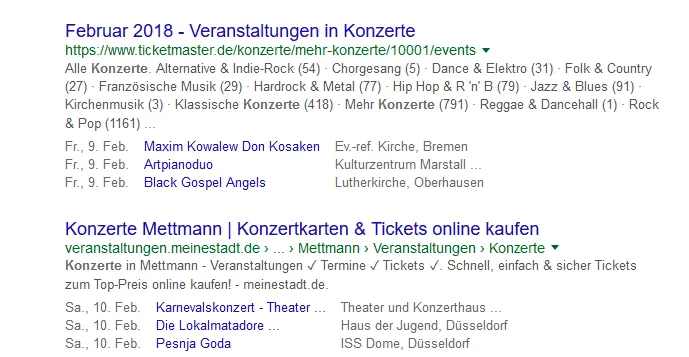
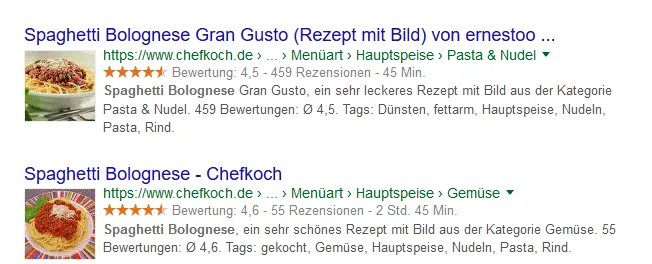
Structured data, also called “structured data,” is NOT a direct ranking factor, but it makes it possible to influence the way your website is displayed in the SERPs on Google. In addition, it helps Google (or Bing) understand your website better.
Examples of markups:
Structured data for events and recipes:
Recommended plugins for implementation:
In Yoast SEO, go to the backend in the sidebar under “Search Appearance” → “General” → “Knowledge Graph”. There, you can enter your website's logo and name as structured data.
You can enter further structured data for your website, for example, with the Plugin Markup (JSON-LD) structured in schema.org.
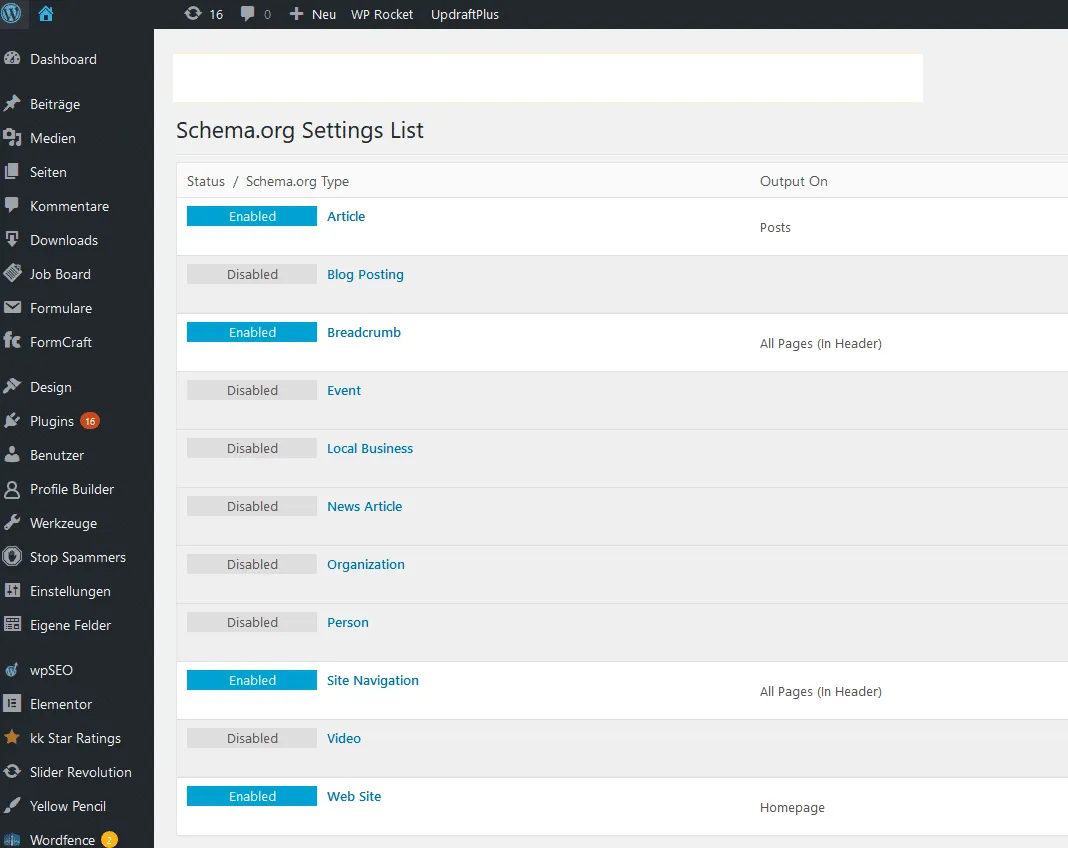
Here, you can enter everything that fits your website, such as articles, blog postings, local business information, the organization, and much more.
Adding Star Ratings via Plugin
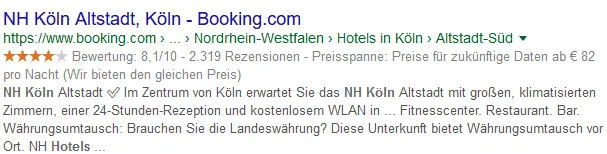
With the plugin RateMyPost you can display star ratings for your URLs in the search results.
Displaying FAQ Boxes in the SERPs
With the plugin WP FAQ Schema Markup for SEO so-called FAQ boxes can be displayed in your snippet. This gives the search result more space in the SERPs and usually gets more attention and clicks.
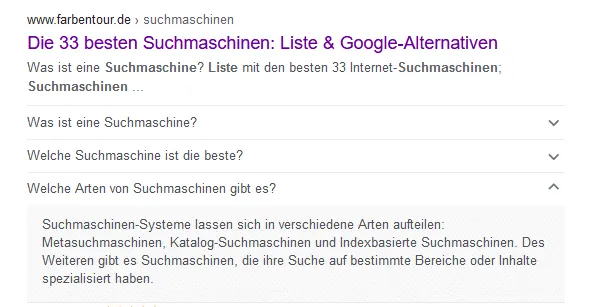
Don't forget that Google itself decides whether your website's information is displayed in the SERPs or not. Also, don't manipulate anything here, as you otherwise run the risk of receiving a Google penalty. With the tool from Google validator.schema.org you can see which data has been implemented correctly and where there are possible errors.
Information Architecture – the Structure of Your Website
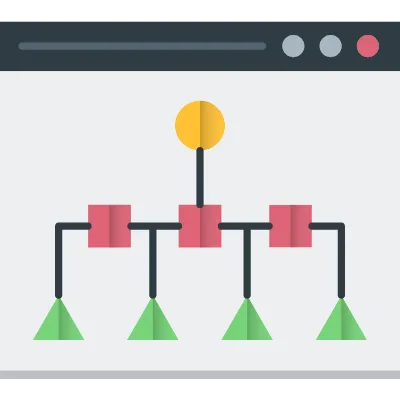
Every single URL on your website that should appear as far up as possible in the search results should also be as easy as possible to reach for your visitors as well as for the crawlers.
Wikipedia example: The user finds an incredible number of subpages on the knowledge platform, but thanks to the clear structuring, almost every subpage can be reached from the homepage with a maximum of three clicks. Through the various categories, Wikipedia has created a broad, easy-to-understand information architecture that is easy for both Google and the user to follow. But how do you create a good information architecture for WordPress?
These seven important WordPress SEO tips will help you with this:
- Every URL that should be found well on Google should be reachable with at most three clicks from the homepage – ideally even with just one or two clicks.
- Cornerstone pages: As already described, cornerstone pages (also called “hub pages” or “distributor pages”) are excellently suited for building a good information architecture. Here at Farbentour.de, for example, the cornerstone page on the topic of “search engine optimization” is the main topic. From this page, all matching topics (subtopics) from the blog are linked. The cornerstone page has been linked in the footer, so you can reach it and its subtopics from the homepage with just a few clicks.
- Important pages should be linked in the menu or in the footer. The most important URLs simply belong in the menu and not hidden on some subpages.
- Optimize internal linking: Internal links within the body text are very important to strengthen the connections between individual articles and to get more link power to the most important pages. You can find more about internal links here on our blog.
Tip: Automate internal links with a plugin: With the WordPress extension “Interlinks Linkmanager” you can automatically have all important keywords linked internally in the right way. A big help with particularly large WordPress websites. Note: Don't link every term pointlessly – please only link the really important pages that you also want to rank for.
- Yearly archive: With the plugin Simple Yearly Archive you can display all posts from the last months and years to your visitors on an overview page. This ensures that even old posts do not fall too deep into the page structure and remain reachable with just a few clicks.
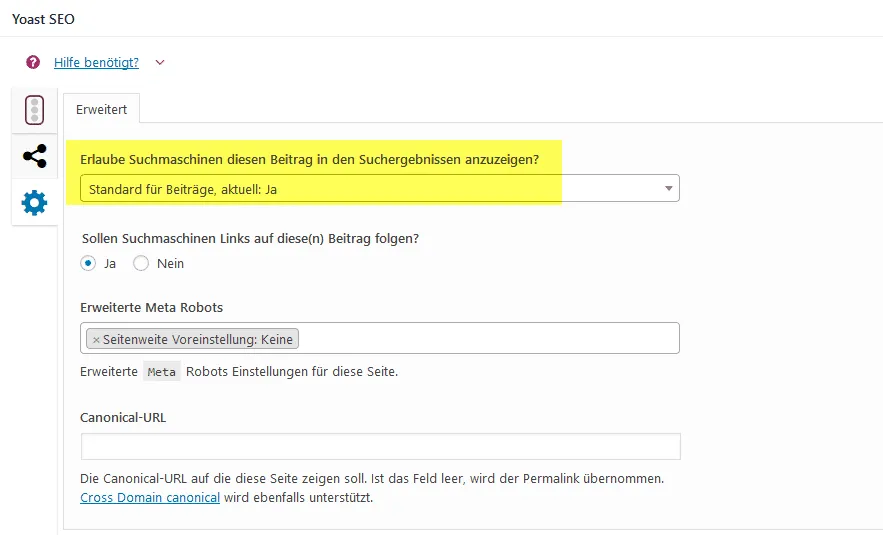
- Pages/URLs without search intent should be set to “noindex,follow”. This way, Google knows whether a page/URL is intended for the search index or not. For example, the imprint or contact form can often be set to “noindex”.
Pages and posts can be set to noindex in the backend
- No broken links: Links to pages that no longer exist or have a 404 error status indicate a structure that isn't clean. Therefore, find and fix all broken links on your website. The plugin Broken Link Checker analyzes your site and reports faulty links.
Image SEO
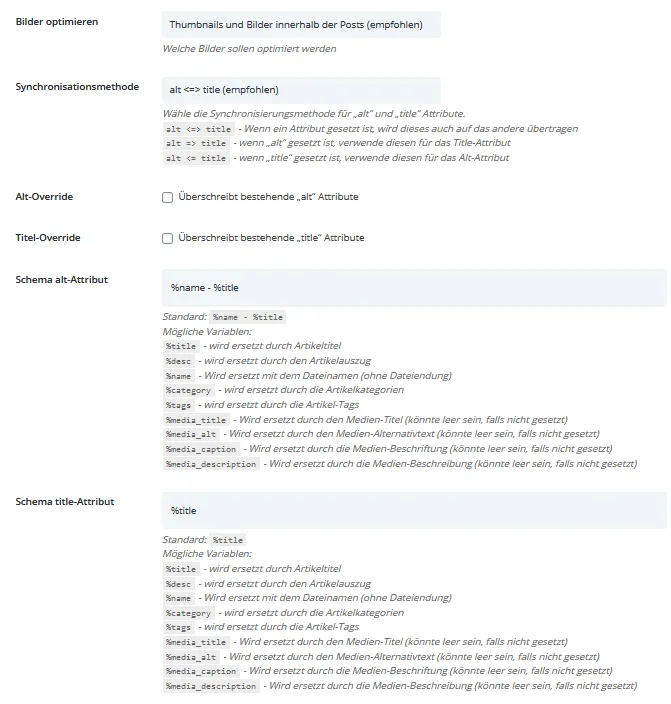
In addition to the compression already mentioned, maintaining the images on your WordPress website is important in order to receive additional traffic via Google image search. It is important that every image in your media library gets an alt tag, an alternative descriptive text with the matching keyword for the image. The title and file names should already contain the main keyword of the image as well.
It becomes cumbersome when you have already uploaded hundreds of images and now have to optimize the title and alt tags for them after the fact. With the plugin SEO Friendly Images, optimizations of the images in the media library can be carried out after the fact and automatically, such as setting alt tags.
Security
An SSL encryption (https) is standard nowadays and simply every WordPress website should have it. It is an additional trust signal to your visitors and Google. Most web hosts now also offer free SSL encryption.
Hacked websites that spread viruses or other junk have no chance on Google and co. Make sure to only install trustworthy plugins and themes – this is often where the biggest security holes are. So-called security plugins can only be recommended to a limited extent, as they don't really help. Instead, use long, complicated passwords and assign secure file permissions (more on this here: binary-butterfly.de/artikel/dateirechte-warum-eigentlich/), so that your website is well protected, and create regular backups, e.g. with the plugin Updraft Plus, in case your site does get hacked, so that it is quickly back online without errors.
If blog comments are allowed on the WordPress website, it is essential to moderate them and not to approve any comments unchecked. Spammers often try to place shabby links here, which can subsequently worsen the quality of your website. Recommended for combating spam is, among others, the Antispam Bee plugin.
WordPress can be additionally secured via .htaccess. Here too: Only for professionals who know what they are doing, as otherwise laypeople can quickly take down the entire website. You can find a detailed list of all possible settings of an .htaccess here: https://gist.github.com/indysigner/2e2dbf70cbe195ec444703bf43c710e3.
Improving the Relevance of Your WordPress Website
After we have optimized the WordPress website for crawling and indexing, we come to the biggest secret: How do we manage to generate a high relevance for our keywords on our website so that we rank as far up as possible?
There are many myths and unconfirmed factors here that make optimization so difficult. According to most SEOs, the two biggest factors are the content on a website and the quality of the backlinks to the website.
The Content on Your Website
Content is immensely important! Google is a full-text search engine that needs text in order to assess whether a page is relevant or not. But before we can create a text that is relevant for the search engines, we first have to carry out a keyword research. After all, what good are texts that have a high relevance for keywords that no one searches for?
Keyword Research
Carry out research for topic-relevant search terms that you want to be found for, e.g. with the tool kwfinder.com. Example: The already mentioned cornerstone page on the topic of “Backlinks” here on Farbentour.de is meant to be found for exactly this keyword; for this, search terms are interesting such as “What is a backlink”, “generate backlinks”, and many more.
Never focus on just one or two keywords, but create a whole keyword set. We have described how to carry out a complete keyword analysis and find as many relevant search terms of your target group as possible in a blog post.

Important: Don't forget to cluster the keywords. It is possible and also better to answer several very similar keywords on a single URL and not to create dozens of URLs for similar keywords. Example: “buy lawn mower”, “buy lawn mower 2022”, “buy cheap lawn mower” are all very similar search terms that should definitely be answered on one URL and therefore have to be clustered. You can find more on this topic here.
Before you finish the keyword research, you should determine the search intent (search intent) for each keyword. The search intent tells you what the searcher actually wants to find through the keyword. Is the user looking for information / answers to a question (informational keywords like “What is SEO?”), do they want to get something (transactional keywords like “download SEO e-book”), or buy something (commercial keywords like “buy notebook” or “ongoing SEO support”)? Only when you know the search intent can you also create content that is loved by your users and Google.
What Is Good Content That Really Ranks?
As already described: Look at the search intent. The top 10 on Google for your keywords already show you very well what information users and search engines want. Google wants to give its users the optimal answers to their questions. For this reason, informative websites that provide the best “answer” for the search term have the best ranking. Ever wondered why Wikipedia.org ranks so highly for so many search terms? Wikipedia is regarded by many as the No. 1 source of information on the internet and therefore ranks accordingly well.
If you create informative and high-quality content (texts, images, videos, infographics, etc.) for your website that answers your visitors' questions, Google will notice this too, and you have a good chance of achieving good rankings.
But what is informative and high-quality content?
High-quality content answers your visitors' search intent to their satisfaction and provides the following:
- Points out (new) insights or solutions for the target group
- Is highly informative and offers real added value (“You won't read this anywhere else”)
- Is authentic and true (don't tell fairy tales)
- Is well researched, including sources
- Is very well written: Easy to read/scan (content design and structure), easy to understand, error-free, and delivers exactly the information promised in the heading
Note: The text should be so well written that your target group recommends it to friends, work colleagues, etc. without hesitation, likes to share it, and/or bookmarks it. If you manage that, you have written a very good text that will achieve good rankings.
As a rule, by analyzing the top 10 on Google for your keywords, you can find out very well what your content must have in order to rank well. Google is getting better and better at recognizing the wishes of searchers (search intent) – so you always have to make sure that you satisfy these needs with your text.
Content Structure and Design
The eye reads along, and since visitors indirectly decide whether content will rank or not (Google is getting better and better at measuring user signals), your website and its content should be visually appealing. Otherwise, no one wants to read them and too many users bounce off your website again.
The following points help you make your content look better and have more structure, thereby encouraging visitors to read:
- Heading structure (H1–H6): Each page may only have one H1 heading, which serves as the headline. This is followed by an introduction, followed by subsections marked with H2, H3, and H4. This way, the text gets a good structure for Google and your readers.
- The text becomes more readable when paragraphs visually break up the text.
- Blogcast: Images, videos, podcasts, and infographics are also useful design elements and draw the reader away from walls of text toward easily consumable elements. Don't forget that texts are still extremely important for achieving good rankings.
- Further style elements can be, for example, a table of contents (TOC – Table of content), visual elements such as images, cinemagraphs, infographics, and much more.
Keyword Density? Where Should the Keyword Appear?
Many, many years ago, keyword density was a cure-all in on-page optimization. But that has (fortunately) changed. Google now understands synonyms very well by now, and anyone who overdoes the keywords runs the risk of being penalized by Google due to keyword stuffing.
So my advice: Don't focus on repeatedly inserting the same keyword into your texts, but rather answer your visitors' questions (search intent), and you will almost automatically write a good, optimized text for your readers and for Google.
How the Yoast SEO Plugin Helps with Optimizing Your Text
The WordPress plugin Yoast SEO helps you optimize your texts for search engines. The plugin checks various aspects of your texts. If they meet the requirements, you get a green traffic light as a reward.
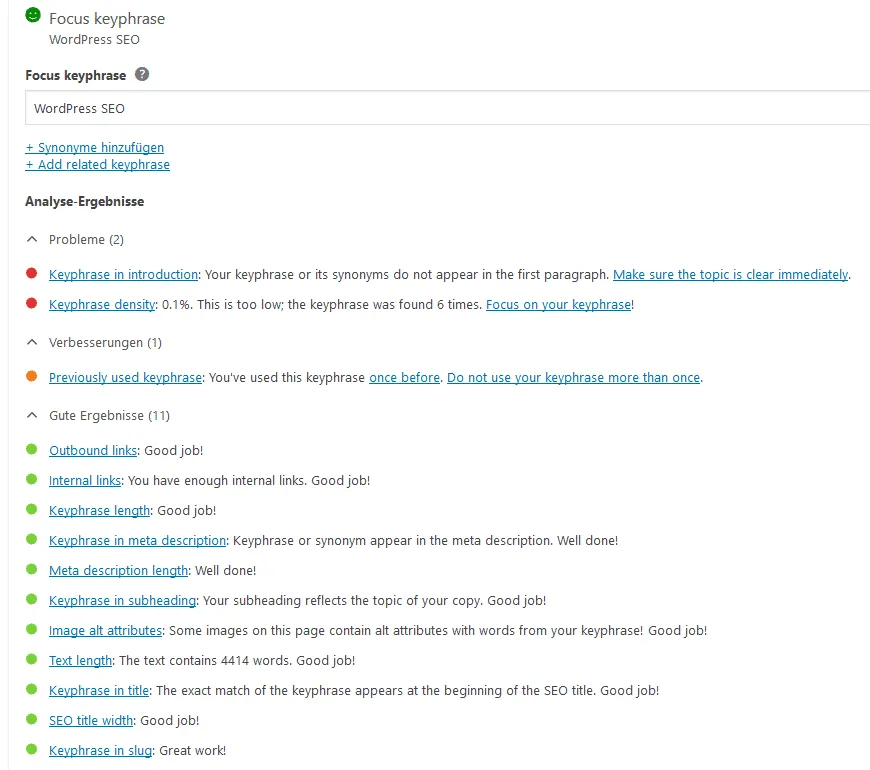
The plugin further checks the keyword density, the titles, and meta descriptions and much more.
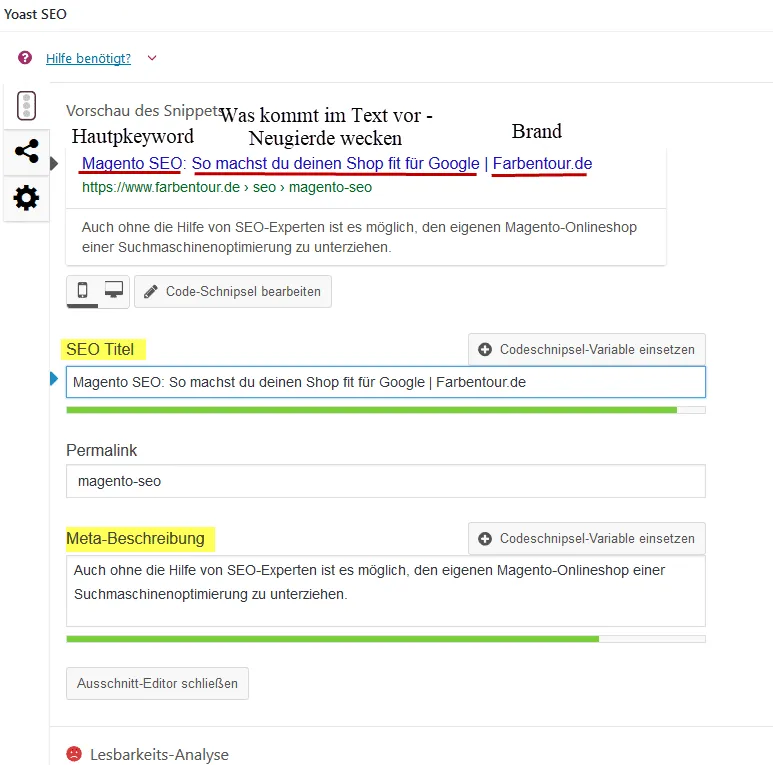
A well-chosen title tag and a matching meta description per page are an absolute must for good rankings (can be set for every URL using the Yoast SEO plugin). Every title should have the following per URL (page):
- A main keyword
- Possibly a second main keyword
- A short description of what awaits the user (arouse curiosity)
- Possibly the name of the domain at the end (brand)
Is the Content Analysis of the Yoast SEO Plugin Really That Important?
No, of course the plugin is not war- … um … SEO-decisive. Just because you have now entered a focus keyword and some points now light up green, blue, or purple, you won't get to page 1. However, this plugin gives you a first rough assessment of the quality of your texts.
For example, the number of words is also checked: If your text has more than 300 words, the plugin's traffic light automatically jumps to green, which isn't really correct. If you want your article to be found well on Google for the focus keyword “WordPress”, 300 words aren't nearly enough. The topic is so broad that you could fill an entire book with it. Therefore, you should not blindly trust the Yoast plugin!
Why Yoast's text optimization recommendations are, well, not optimal, we have summarized for you in the following video:
Tip: Another good analysis tool for analyzing and optimizing texts is the tool from Wortliga.de. We have already had very good experiences with it in the past.
WDF*IDF Optimizations – Useful or Not?
Anyone who wants to make the effort can, of course, run a wdf*idf analysis, e.g. with Seobility or Termlabs.io and optimize their text accordingly.
But keep in mind: Many search engines no longer use the classic wdf*idf, but rather extended models. Optimizing your texts for this formula is therefore only helpful to a limited extent. If you can answer your users' most important questions and meet the criteria (high-quality & informative content), the text will rank excellently anyway. Be sure to look at the word count of the competition. If your text is far below that, you may have forgotten important information.
As a little insider tip for optimizing keywords with information-driven search intent, the tool Surferseo.com has turned out to be great: It offers very clear and precise analyses. Definitely worth a look if you want to optimize your texts according to WDF*IDF.
Off-Page Optimization – SEO Tips for Building Backlinks
Backlinks are still important: Anyone who can present a link profile with strong backlinks has particularly good chances of getting to the top. With strong backlinks, you show Google your authority in your niche – and that is exactly what the search engine wants to see in order to trust you. But how do you get such strong links?
Guest Articles
Especially by writing guest articles on well-known websites, you can not only increase your reputation, but also build strong backlinks. But don't make the same mistake as 90% of all people: Simply writing an email to various websites and asking about the possibility of a guest article won't work. Every week, we alone receive emails from various agencies asking whether we would like to publish their great (*irony*) articles. That will not work!
First, get in contact with the operators of the website. Be it through a blog comment or a personal conversation. Try to make yourself visible to them. There are dozens of different ways. Ask for advice or an opinion on a certain topic (most are happy to help). Get to know the operators personally, because they simply feel used when you send them a standardized email. You can find more on this topic here: Blogger Outreach.
Further ways to build links:
- Linkbaits (newfangledly called “Digital PR”)
- Free links, e.g. via business directories (this provides an initial baseline for new websites)
- Content Marketing (interviews, studies, podcasts, wikis, and much more)
- Egobaits (here is an example)
- Sponsoring (careful, this violates the Google Guidelines if not labeled)
There are still dozens of other ways to build links. You can find more on this in our Linkbuilding Guide.
WordPress SEO Tips for International Sites
If your WordPress website is to be available in several languages and displayed accordingly in different countries, it is highly advisable to work with the hreflang tag.
With this tag, you show Google which URL is suitable for which country and which language.
Example:
- English-language subpage for the UK
- English-language subpage for the USA
You need to have these language codes on every subpage. Of course, there are suitable plugins for WordPress here, such as wpml.org. After prior configuration, such a plugin automatically inserts the correct hreflang tags everywhere.
Faulty hreflang tags can cause the website to be displayed for the wrong country. Therefore, these tags should always be checked after being inserted, e.g. via the hreflang validator from Sistrix: app.sistrix.com/de/hreflang-validator.
The different language versions should be embedded in directories and not in subdomains – example: deine-websites.de/en/ or deine-websites.de/uk/. Subdomains are regarded by Google as a completely new website and therefore often rank worse than the main domain.
Conclusion
WordPress really is a fine thing – even without programming knowledge, virtually anyone can build a website that is optimized for the search engines. So that your WordPress website continuously receives corresponding traffic via Google, you should take care of the factors crawling, indexing and relevance.
Keep in mind that SEO is always associated with fluctuations. New ranking factors and more considerably influence the positions in the SERPs. So always stay up to date and continuously optimize your website.
FAQ WordPress SEO
To finish, we would like to address the most frequently asked questions that we have come across on this topic over the years.
Is WordPress even suitable for SEO?
Yes, Google has confirmed several times that they do not prefer any particular system/CMS. What matters is that the website can be indexed flawlessly.
I don't want to use Yoast SEO! Are there other SEO plugins?
No problem. There are dozens of other good SEO plugins out there, such as SEOPress, SEO Framework, all in one seo pack.
My site loads very slowly despite a caching plugin?
That's quite possible, because a caching plugin alone is not the cure-all. Often, people cut corners on hosting. Therefore, don't host your site with mass and cheap providers, but choose dedicated WordPress hosts. Here, the loading times are usually already good to very good without any further optimization. Also make sure not to have too many plugins installed and to compress the images. Raidboxes, Pure-Host, Timmehosting, Hetzner, and many more are good and fast WordPress hosts.
My site isn't ranking, why?
There can be dozens of reasons for this. Optimize your pages according to the three factors we have described for you here in the article: crawling, indexing and relevance. Also have some patience: For newer projects, good rankings can easily take one to two years to appear.
How long should a text be? How many words?
Not too short, but also not too long ;-). Write the articles so that all open questions are answered. There is no minimum number of words! Look at the top 10 on Google for your keywords – how long are their texts?
Are page builders like Elementor, Beaver Builder, Gutenberg & co. suitable for WordPress SEO?
Yes, but they increase the size of the website and thus also the loading times. This should be optimized properly in order to compensate for this disadvantage.
What is your challenge with WordPress SEO? Do you have a question that isn't answered here? Drop it in the comments section!
Need a GEO check?
Get in touch for more visibility – in search engines and AI answers.
- More visibility and leads via Google and AI chats
- Sustainable SEO & GEO strategies
- Personal support


