
E-Commerce & Online Shops
The Shopify SEO Guide for More Visibility and Traffic


Shopify makes it possible for anyone to create an attractive online store in next to no time. Entirely without IT or programming skills. But for a store to become a success, its operators have to take care of search engine optimization.
In this blog article you will learn why SEO is the top priority and how you can improve your store's visibility with simple means.
Shopify is so successful because the platform makes setting up and running an online store child's play. You don't have to download, install or even program anything.
Instead, for a flat monthly price you get a ready-to-go system whose frontend design can be customized very extensively. Simply create products and sell them. E-commerce has never been this easy.
But it isn't quite that easy after all. In the end, only someone who somehow becomes aware of your online store can buy from it. And that requires marketing. As a store operator, you are responsible for the marketing and the optimization yourself.
While marketplaces like Amazon at least provide a certain background noise (which you pay for with maximum dependency), an online store is only as successful as its visibility. No visitors, no orders and no revenue.
Shopify and SEO – the recipe for a successful online store

There are various sources of visitors. The most important and at the same time most sustainable one for store operators is Google organic search.
Anyone who wants to buy something online searches on Amazon or on Google for a product that satisfies their need. Amazon only shows its own products and the products of merchants on the Amazon Marketplace. Google, on the other hand, indexes the entire World Wide Web – websites, blogs and stores.
The search engine rates and sorts the websites according to universally applicable criteria. This means that in principle everyone has the chance to be found with their online offering via Google and other search engines.
The decisive factor here is that your page is displayed as far up in the search results as possible. This is what we call ranking.
The better the ranking, the more attention and clicks a search result receives. As early as page one of the search results, the click-through rate drops noticeably with each position. Only positions one through three are really strong. Hardly anyone even looks at the second or following search results pages.
This means: Of the millions of online stores that exist, only very few even have a chance of achieving a relevant placement in the search results.
Many websites are fighting over a few top spots. That is why it is important to improve the rankings and the visibility of your online store. That is exactly what search engine optimization – SEO for short – makes possible.
Tap into a free traffic source with Shopify SEO
Where your Shopify store ranks in the search results is determined by around 200 different ranking factors. The goal of SEO is to optimize these factors so that your store is as visible as possible on Google and the like.
There are ranking factors whose optimization works quickly and easily – even without an experienced agency. Many factors, however, are complex, require a high optimization effort or can only be influenced indirectly.
In this blog article, you will learn from the very beginning the most important levers you can use to instantly give your online store more visibility.
The great thing about search engine optimization is: You benefit from it long-term – unlike, for example, PPC advertising. It does take a little time until SEO measures show an effect, but in return solid search engine optimization has a lasting impact.
Whereas your traffic from paid ads immediately drops back to zero once your budget is used up. Search engine optimization gets you free, independent traffic.
Finding the right keywords for your store
In order to get qualified traffic via Google, you first have to know what your target audience is actually searching for. Because those are ultimately the keywords for which your store should appear as far up as possible.

There are numerous SEO tools for finding this out. The really good tools, however, cost money. Here are a few tips on how to get by without paid tools, at least to get started:
- Think from the customer's perspective
Try to put yourself in your target audience's shoes and ask yourself what you would google if you wanted to inform yourself about your products or buy them.
- Google Suggest
The autocompletion of search terms shows you what Google users search for most frequently. Simply enter a keyword into the search field, press the space bar and receive valuable search suggestions, which are nothing other than keywords.
- Related searches
At the bottom of the search results page, Google shows you similar search terms from users that are very similar to the keyword you entered.
- AnswerThePublic
AnswerThePublic is one of those SEO tools that, after you enter a keyword, spits out many relevant search term alternatives. The data are a valuable source of inspiration. The SEO tool can be used free of charge for an initial, limited keyword research.
Keyword research for your Shopify store
In keyword research you collect as many suitable keywords as possible. The easiest way is to list these in an Excel spreadsheet. If you take enough time for a brainstorming session or even invest in an SEO tool, you will quickly see that there are usually hundreds or even thousands of keywords that come into question in principle.
Search volume identifies lucrative keywords

That is why, in a second step, it is essential to separate the wheat from the chaff by identifying the truly relevant keywords. This is possible via parameters such as the search volume and the search intent.
The search volume indicates how often a search term is searched for in the search engine per month. To find this out, you unfortunately can hardly avoid an SEO tool. The Google Keyword Planner unfortunately only helps you if you have active Ads campaigns. Otherwise, the values are now very imprecise. The rule of thumb is: The higher the search volume, the more attractive a search term. Because it simply allows you to potentially reach more people.
Caution: Search volume isn't everything!Search volume offers good orientation. But you shouldn't rely on this value alone. Especially with typical B2B keywords, the search volume is often significantly lower than in B2C. Nevertheless, it can still be lucrative!
If, for example, you sell a high-priced specialty tool in your Shopify store that is only googled ten times a month, but you capture the bulk of the traffic for this term and at the end of each month sell two tools, that is a worthwhile business.
Search intent provides insight into needs and expectations
The search intent is the intention with which someone submits a search query. Google defines various search intents. In a know search, the user wants to learn more about something. This is also referred to as an informational search.
In a do search, the user wants to carry out a specific action – for example, make a call, download something or indeed buy something. When someone searches for “buy Puma Deviate Nitro Spectra”, it is clear that this is a transactional search. Perfect for an online store!
By now, Google is very good at identifying the search intent behind a search query and displaying suitable search results.
An example: Someone searching for running shoes is understandably not interested in coffee beans at that moment. But what are they up to? Do they want to inform themselves about the different types of running shoes? Learn how to clean, repair or properly dispose of running shoes? Or do they want to buy running shoes?
With this single keyword, that isn't entirely clear, although the majority is likely to be a transactional keyword. This case is clear: “buy running shoe” is a transactional keyword that very probably leads to a purchase.
Whereas “running shoe correct size” is an informational keyword. And “Adidas” is a navigational one, because the user most likely wants to visit Adidas's website or store.
What the user expects from the pages in the search results depends on the search intent. If they want to find out about the correct size, there is little point in sending them to a store category full of shoes. Google wouldn't do that either.
Because Google's top priority is to present its users with the most relevant search results possible. Only then can Google maintain its market-dominating position. If Google increasingly delivers results to us that don't match our expectations, we quickly look around for an alternative search engine that works better.
It stands to reason to optimize your own online store for keywords with do intent. These are, for example, all search terms that contain “buy” or “order”.
Because with “buy running shoes” it is clear that the user has a clear purchase intention. They are far along in their purchase decision process, know what they want and are willing to spend money. So the online store is exactly where they belong. However, these transactional keywords are highly sought-after and heavily contested due to their high purchase probability.
There are industries in which it is barely possible to achieve relevant rankings with a reasonable amount of effort.
Store traffic through information-driven keywords
In that case, it is often sensible to concentrate on informational keywords. These allow you to lure potential customers into the store who aren't yet one hundred percent ready to buy, but who can definitely be won over by the products you offer.

Someone who informs themselves about the different types of running shoes appears to have a need for new running shoes. They may not yet be aware of it. But that initial interest presents a great opportunity to lead the user to your own products in the store.
To win customers via such advice topics, you need high-quality content that offers real added value. That is the case when the content answers users' questions or offers them the solution to a problem.
Creating such content is time-consuming. It costs time, money and usually both. But it is worth it, because it allows you to build up permanent streams of traffic. Such content can be published, for example, in a blog or a magazine.
It is best to write down the search volume and the search intent next to each keyword in your Excel spreadsheet. There are SEO tools that indicate the search intent for you. However, this assessment should sometimes be taken with a grain of salt.
When in doubt, it is worth taking a look at the top 10 search results for the keyword. Many store pages point to a transactional keyword. Many articles, guides, videos, etc. point rather to an informational keyword.
In the last step, you have to prioritize the keywords for yourself. A fourth column that reflects the competitive situation helps with this. Many tools show this. Based on all these parameters, decide how lucrative and challenging it is to rank well for a keyword.
Placing keywords correctly in your Shopify store
For online stores, the basic keyword research is easier than it sounds. After all, you have concrete product pages on which your leeway for choosing keywords is limited. With SEO, it is more a matter of placing the keywords correctly.
The main keyword you identified with the help of keyword research – that is, the search term with the greatest relevance (also called the primary keyword) – should appear in the following places:
- Page URL
Instead of consisting of illogical character strings, as many CMSs generate, a page's URL should always be readable and contain the primary keyword. Especially since not only Google, but also many users take their cue from it.
- Meta title
The meta title (page title/title tag) is displayed in the browser and titles the page briefly and concisely. The title of the page should not be longer than 55 characters.
- Meta description
The meta description (page description) is the somewhat more detailed content description of the page. It is not shown to the store visitor, but appears in Google search. The description of the page should not comprise more than 160 characters.
- Page heading
The headings on a page are hierarchized with descending numbers. The H1 is the most important heading, followed by H2, H3 and so on. The H1 occurs only once and should definitely contain the keyword. The following headings should each contain it when appropriate.
- Body text
Naturally, the text itself should also feature the keyword. But it usually does so by nature, for example when you write a product description that is useful for the prospective buyer. However, there are still numerous stores that provide no product description at all and thus leave basic potential for improving the ranking untapped.
Good to know: Google snippetMany of the places in your online store mentioned for keyword placement feed the Google snippet. The snippet is the small preview of your website that appears in the search results. It consists of the URL, the page title (meta title) as well as the description (meta description).
The snippet is very significant for search engine optimization. Because it determines whether a user visits your page or not. The more often the snippet is clicked, the better the click-through rate. Google classifies pages with a high click-through rate as more relevant than those with a low CTR. It is a positive user signal.
What does that mean for you?
You shouldn't leave the snippets to chance, but check them before publishing a new product. A good snippet catches the user's attention, builds trust and invites clicks. It should make clear that my need will be satisfied on the page, then I will click too. A call-to-action (CTR) can improve the click-through rate.
Optimizing the snippet is one of the simplest and at the same time most efficient measures in search engine optimization (SEO)!

Category pages as a traffic magnet
An online store classically offers three ways to place content enriched with keywords. The product page should be self-explanatory. Here it is a matter of describing the product in a sales-promoting way. The content on the category pages has a more informational orientation. In categories, products of the same type are sorted. They make a store clearer and invite browsing.
Many store operators do create categories and assign products to them, but do not use the SEO opportunities that category pages open up. By filling your categories with content that offers visitors added value, you increase the ranking of these pages and thus raise your store's visibility.
Let's take the example of a cordless drill: Someone who wants to buy a cordless drill but doesn't yet know which one is right for them searches more with general, information-oriented keywords. On a product page you can only reproduce what the product can do. On the category page you can talk about the entire variety of cordless drills. About functions, use cases, manufacturers and more. With this strategy you lure a different, additional target audience into your store.
Creating a category and placing keywords in a targeted way
A page's main keyword should definitely occur in the title, the H1 heading as well as in the URL. Headings are sorted hierarchically from one to six. The more important a heading, the more you should make sure to incorporate the key terms you determined in the keyword research.
Note, however, that not every heading has to contain the main keyword. By working with synonyms, you optimize your page for search engines and at the same time ensure pleasant readability.

Shopify avoids duplicate content through the canonical tag
In online stores it happens particularly often that several pages have the same content. This is rarely intentional, but sometimes happens automatically with store systems by generating different URLs.
This already begins with the fact that the domain is accessible both with and without “www.”.
In addition, Shopify creates an additional URL for every category into which a product is classified. The more categories a product belongs to, the more URLs that ultimately have the same content.
Examples of additional URLs generated by Shopify
A shirt that is classified in three categories is accessible on Shopify via the following URLs:
https://www.domain.de/products/herren-hemd-kurzarm-kariert-marine
https://www.domain.de/collections/herrenmode/products/herren-hemd-kurzarm-kariert-marine
https://www.domain.de/collections/kurzarm-hemden/products/herren-hemd-kurzarm-kariert-marine
https://www.domain.de/collections/sommertrends-maenner/products/herren-hemd-kurzarm-kariert-marine
Duplicate content can impair the ranking, because providing the same content under different URLs is abused by some webmasters and SEOs with the aim of improving visibility.
Even though Google tries to distinguish between malicious and non-malicious duplications, you should make it as easy as possible for the search engine and not let any doubts arise in the first place.
Especially since this also signals to Google which URL you primarily want to be ranked with.
To tell the search engine which of the pages with identical content is the main page, the canonical tag is used. It appears in your store's source code and contains the corresponding URL of the main page. On Shopify, there is no direct way to set canonical tags in the backend without an app. The good news: The store system does this automatically for the category-product URLs mentioned above.
If you assign a product to a category, the page under the URL https://www.domain.de/collections/kategoriebezeichnung is extended with a canonical tag in the source code that points to https://www.domain.de/products/produktbezeichnung.
Example of a canonical tag
The canonical tag is placed as a <link> element in the <head> area of the HTML page:
< link rel=“canonical“ href=“ https://www.domain.de/products/produktbezeichnung“ / >

Image SEO with Shopify
Text content peppered with keywords is one thing. But to a significant extent, selling happens through images. And you can and should optimize these too.
The great importance of product presentations is obvious: Because online we don't have the option of taking the products in our hands, examining them up close, feeling their haptics or even trying them out, the visual presentation has to compensate for a lot. Flawless product photos are therefore indispensable. Missing photos are definitely a no-go.
Product photos influence not only the conversion rate in the store, but also the visibility in the search results. On the one hand, there are now various search result presentations in which the product photo is part of the snippet or even takes center stage.
These snippets record a better click-through rate. On the other hand, there are numerous potential customers who use Google Image Search for their product research.
Especially when buyers already have a concrete image of their desired product in mind, many use image search to look for it specifically. If they like one of the products listed there, they click on it and thereby arrive at the product page in your store.
The problem: Google can't “read” images. Despite much progress, it is still difficult for the search engine to grasp the image content. Especially when it isn't just a single apple depicted, but the photo is bursting with complexity.
That is why you have to provide the search engine – wherever possible – with information about the image content.
This is possible in the following places:
- Name of the image file
Out of the camera, photos have a cryptic file name. Give the image file a readable name that describes the image content. This gives Google an initial, important clue.
- Alt text
The alternative text is actually a placeholder in case the image cannot be displayed for technical reasons. Then the alt text appears. It is also read out to visually impaired users by screen readers and thus increases accessibility.
Use the alt attribute also to describe the image content as precisely as possible. Search engines and users with impairments benefit from this alike.
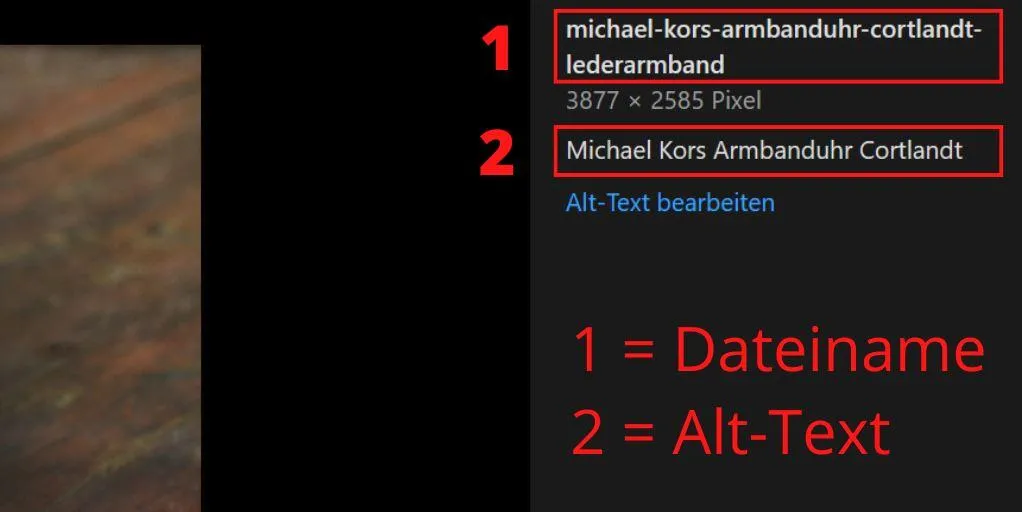
Image caption
Image captions, so-called captions, likewise provide Google with important info about the image. However, these are unusual in online stores and are therefore not provided for on Shopify either.
If, however, you use the store system at the same time as a CMS, for example to run a blog, you can definitely add image captions with the help of an app. You should definitely make use of that!
Loading times of images are optimized by Shopify
Actually, a store can never have enough images. But photos have one disadvantage: They reduce the loading time, which is an important factor precisely for e-commerce websites. Not only because loading speed influences the ranking, but also because it has a direct effect on the conversion rate.
The good news: Shopify handles the compression of images for you. So you don't have to do that manually in advance, but can upload your photos in the best quality.
In addition, Shopify delivers your images in the best possible image format in each case, by having the system recognize which browser the visitor is using and which image formats are supported. This means you automatically benefit from modern, particularly high-performance image formats such as Progressive JPEG and WebP.
The platform currently supports the following image formats:
- JPEG
- Progressive JPEG
- PNG
- GIF
- HEIC
- WebP
- AVIF
More tips for optimizing page speed
Not only images have an influence on your page speed.
Here are four more tips for making your Shopify store even faster:
- If you work with a theme, then choose a design template that is programmed to be fast from the ground up. Pay attention to the range of functions: Unnecessary features that you don't use anyway slow down performance. The theme is the foundation of your store. If the foundation already slows down the loading time, top performance is no longer possible.
- Accelerated Mobile Pages (AMP) increase the loading time on mobile devices such as smartphones. This is particularly important because on the go it usually has to be quick, but the mobile connection is rarely good. Shopify unfortunately does not support AMP by default. In the Shopify App Store, however, there are some apps that automatically create AMP pages of your store.
- Apps can be very useful, but the more of them you use, the slower the store platform becomes. Therefore check regularly whether all installed apps are still in use and really needed.
- Sliders have two problems: They eat up an incredible amount of loading time and are barely noticed at all by visitors. Hardly anyone looks at the images presented there. Even fewer click on them. So you can safely replace your slider with a hero image and thereby noticeably speed up the loading time.
How fast your website currently is and whether there is optimization potential regarding page speed, you can find out, among other places, in the Google Search Console. The tool PageSpeed Insights also provides an initial assessment of the loading speed.
Using URL redirects cleverly
Another factor that can influence your store's page speed are redirects. In principle they are a good thing. Because with a redirect you can reroute your traffic. For example, when you remove a product from the store because it is no longer for sale.
This product page is probably already well connected on the World Wide Web and linked to multiple times. Without a redirect, visitors would be shown an error in the browser (404 error page).
That spoils the shopping experience and customer satisfaction.
In order not to lose the traffic completely and to at least still have the chance of a conversion, you should redirect the URL. For products that are no longer available, it is usually advisable to point to the respective category. That way the visitor can get an overview of the alternatives and may still become a customer after all.
Tip: To identify onpage errors that require a redirect, you can use SEO tools like Screaming Frog.
To set up redirects on Shopify, you have to open the item “Online Store” under “Sales channels”. If you click on the item “Navigation” in the submenu, the overview page opens. At the top right there is the item “View URL redirects”. There you see an overview of all set-up redirects and can set up further redirects via the button “Create URL redirect”.

Make sure, however, that you don't create redirect chains. These cause unnecessarily many HTTP requests, which in turn impair the store's loading time. Redirect chains arise from a large number of coupled redirects.
If you already redirect from page A to page B and now want to redirect to page C, then you should rather change the existing redirect instead of redirecting from A to B and on to C.
Shopify automatically generates an XML sitemap
To make it easier for Google to index your store pages and to speed up the entire process, you should submit an XML sitemap of your store in the Google Search Console. Google calls up the link regularly and checks whether there are new or changed pages.
The advantage with Shopify is that the platform automatically generates a sitemap in XML format. It contains all pages whose indexing you haven't blocked. You call up the sitemap quite simply via the following example link: https://www.domain.tld/sitemap.xml
Submit the link to the sitemap in the Google Search Console.
By the way: If you use the function for international domains, then Shopify automatically generates sitemaps for all your domains.
Setting up robots.txt in Shopify
If you don't want certain pages to be included in the search engine's index, then you can exclude these, for example, via the robots.txt. This is a text file that is actually intended to manage the crawling traffic.
While Shopify unfortunately does not offer a direct way to edit the head area of your store and work with the meta robots tag there, since 2021 you can at least edit the robots.txt.
Shopify has already created a corresponding file and blocked pages and directories there that the programmers consider worth protecting. A classic example is the backend, which is uninteresting for search engine users and does not need to be indexed.
To adjust the robots.txt, you proceed as follows in the backend:
- Under “Sales channels” > “Online Store”, open the item > “Themes”.
- For the respective theme, click on the button with the three dots and then on “Edit code”.
- In the left-hand menu, look under templates for the file “robots.txt.liquid”. If there is not yet a robots.txt file, you have to create it as a new template (see image).

Once you have opened the file, you see the content of the robots.txt. On Shopify, this is written in the template language Liquid. You can recognize this by the curly braces with the percent signs. To now exclude a page from indexing, you can work with the standard specifications outside of Liquid.
An example of how you protect entire directories, individual pages and documents from indexing by the Google bot:
User-agent: googlebot
Disallow: /beispiel-verzeichnis/beispiel-seite/
Disallow: /beispiel-verzeichnis/
Disallow: /beispiel-seite.html
Disallow: /beispiel-datei.pdf

Caution: No support for robots.txtShopify does allow you to make changes to the robots.txt via the backend, but offers no support for it. You should therefore only make adjustments or additions if you really know what you are doing. In addition, there is always the risk that you accidentally exclude pages from the index that you don't want to exclude at all. This can have serious effects on your company's rankings and revenue. When in doubt, it is better to hire an SEO agency that knows Shopify SEO.
Internal linking is simple and effective
Internal linking is one of the most important and most successful ranking factors – especially for online stores! Unfortunately, it is also one of the most underestimated. Yet internal linking fulfills several functions at once:

- Explains the structure of your store to the Google bot and helps with the crawling and indexing of all pages
- As a navigation element, improves the user experience
- Increases the time spent in the store
- Distributes the link juice of external backlinks (links) to the subpages
Links are the bridges of the internet. The Google bot, too, works its way from link to link in order to find new pages as well as changes on existing pages. You can help out with a sitemap, but without links you make it unnecessarily difficult for everyone involved.
There are various ways of internal linking. You can set the links manually, which you should do wherever it makes sense. A breadcrumb navigation automatically ensures more structure and internal links. You can implement this relatively easily via an app. The same applies to related products, which work similarly to the related posts at the end of a blog article and, by the way, generate more revenue.
With internal linking, you should make sure to link in all directions. So not only into the depth, but also from a product page back to the category. Linking is especially important from pages that receive many backlinks. Because every external link brings link juice to your page. Via internal links, this link power is distributed to subpages. That way you actively strengthen them in the ranking.
Since the link juice is passed on evenly, you can control how much link juice each page receives via the number of internal links that go out from a page. So it isn't just about the mass of links. If you want to specifically push certain categories or products, you shouldn't dilute the link juice too much, but channel it through a small number of deliberately placed links.
With the anchor text you tell the search engine what the target page is about and for which keyword it should ideally rank.
Offpage optimization: backlinks for your online store
So far we have looked at SEO measures that you can implement yourself directly in your store. This is referred to as onpage factors. But there are also influencing factors outside your website that have a hand in the ranking. The so-called offpage factors. The best-known and most important are the backlinks already mentioned.

Backlinks are external links and thus the opposite of internal links. These links, which point from a third-party page to your page, are rated by Google as recommendations. The idea comes from the world of science: There, an author is all the more important the more often they are cited. And a citation is ultimately nothing other than a reference to a person.
However, not every link is worth the same. If you run a store for animal food, then an off-topic store from a finance website is less valuable than if you receive a link from an animal magazine or a veterinarian. In addition to the thematic context, the authority of the link source plays a major role. The more esteem and trust Google grants a website, the better. In principle, good examples are backlinks from well-known, reputable news sites – whether regional or national. Links from disreputable spam sites, on the other hand, can even harm your store.
Because links are so important for the ranking, they are hard to get. Online stores in particular have a hard time with link building. Who likes to link to products anyway? That is why it is important that you create non-commercial content in your store that is so good that people voluntarily link to it from outside.
Let's stay with the store for animal food: In blog articles you can, for example, give tips for the healthy nutrition of various pets. Present different feeding methods along with their advantages and disadvantages. The better you do this, the more links your content will receive. Via internal linking you can then transport the link juice onward in a targeted way and thus also push products.
Conclusion: Shopify SEO increases your revenue
An online store without search engine optimization is barely viable given the enormous competition in e-commerce. With Shopify SEO you continuously and sustainably increase your visibility and your ranking in Google search. That way you tap into the most important organic traffic source and make yourself independent of paid ads. Because while SEO has a long-term effect, ads on Google or social media no longer generate revenue as soon as you cut the budget.
If you implement the tips in this guide, you have created an excellent foundation for your company. Much can be optimized directly via Shopify. If the competition in your industry is very strong, then an experienced agency that is specialized in SEO can stand by you with help and advice.
Need a GEO check?
Get in touch for more visibility – in search engines and AI answers.
- More visibility and leads via Google and AI chats
- Sustainable SEO & GEO strategies
- Personal support


