
E-Commerce & Online Shops
Shopware SEO: The Most Important Basics for a Better Ranking of Your Online Store


It has never been easier to open and run an online store than it is today. This is due in no small part to easy-to-use shop systems like Shopware.
Shopware is one of the top 3 most-used systems and offers you many ways to optimize your store for search engines like Google. In this article, you'll learn which aspects you need to pay attention to when optimizing your Shopware store.
Why SEO for Shopware?
E-commerce is booming. But as revenue grows, so does competition in the market and in the search engines. Shop systems like Shopware in particular lower the barriers to entry enormously. They make it possible, with just a few clicks and at a low price, within a few hours, to open your own online store. Without any special technical knowledge. This naturally makes the competition much greater, since just about anyone can create their own online store.

But even with an established system like Shopware, an online store is no sure-fire success. Quite the opposite: to generate traffic, that is, to attract potential customers to the store, a good ranking in the search engine results is indispensable. You achieve this through continuous search engine optimization (SEO).
With SEO, you achieve sustainably more visibility and therefore more traffic. The more users visit your store, the more can become buyers as well. Ultimately, this has a positive effect on your revenue. Shopware SEO is therefore primarily an investment that pays off in the long term, because it brings you more conversions, more revenue, and, in the best case, more profit.
Good to know: Most traffic comes via search engines
Organic search is the most important traffic source for many online stores.

If you implement the following SEO measures, you'll quickly notice that your visibility increases and that this gives you advantages over your competitors. You can apply all the tips and tricks in this article without the help of an SEO agency.
If you would still like professional support, then feel free to contact us. As an experienced agency, we're available for all your questions about SEO.
The Most Important Basics for Shopware SEO
Modular systems for websites and online stores are easy to use, but not always particularly SEO-friendly. Technical aspects in particular can't always be optimized so easily for Google and the like, because the systems are largely closed. The more professional a shop system is, the more search engine optimization (SEO) options it offers.
Shopware comes equipped with good default settings and lets you make a number of settings in the backend that improve your ranking.
Content is ranking factor no. 1 – even in online stores
The most important thing right up front: for online stores, too, content is the decisive ranking factor. There is no more important one – and that's easy to understand even for non-SEOs. Without content, no one knows what you sell. When we talk about content, in the case of stores we mean in particular the combination of text and image. But videos can also be integrated well with Shopware 6.
Product presentation is even more important in an online store than at the point of sale – after all, the items in the store can't be touched and can therefore only be examined to a limited extent. Important sales factors, such as the feel or trying products out, are completely absent.
If texts and images aren't convincing, it's of little use if the other ranking factors have been fully optimized. That's why poor rankings are, in most cases, due to inadequate content. So make content optimization the top priority of your SEO measures. If you have many products in your Shopware store, first carry out a prioritization and start with the most important, because most profitable, items.
Product descriptions in Shopware
The product description is the most important piece of content in an online store; after all, it decides – together with the product images – whether an item ends up in the shopping cart or not.
Ideally, you create an individual description that addresses the features and benefits of the product. In the case of classic merchandise that is sold by various retailers, store operators often fall back on the product descriptions provided by the manufacturers. That's convenient, but also dangerous. Google could recognize this as duplicate content and penalize it.
Above all, however, these standard descriptions are usually not exactly conducive to sales. You don't set yourself apart from your competition, you use the same keywords they do, and you have no SEO advantages whatsoever. That's why you should at least subject the manufacturer's description to an individual customization.
Category descriptions in Shopware
An online store with a larger number of products is usually structured into categories. Shopware offers the option of placing a category text on these overview pages, which is displayed above the listings. Be sure to take advantage of this option for placing additional SEO content so that your visibility increases through the ranking of category pages.
Creating landing pages with the Shopping Experiences
What was still called “Shopping Worlds” in Shopware 5 is called “Shopping Experiences” in Shopware 6 and can be found under the menu item Content. The Shopping Experiences can also be compared to a content management system (CMS) that has numerous templates.
For example, the earlier Shopping Worlds made it easy to create landing pages. If you own an online store for fashion, for instance, you could already create thematic landing pages presenting the latest swimwear collection. With the Shopping Experiences, you can now also create a blog and the legally required pages such as the imprint, privacy policy, and terms and conditions, which, using noindex, you should exclude from indexing. You'll learn how below.
Hierarchical headings
Whether it's a product page, category, or landing page – wherever there is content, work with the SEO-friendly heading tags. On product pages, the product name is automatically the H1 heading. Here, however, you can define additional attributes (H2, H3, H4, etc.) via the text editor, just as with the other page types. For categories, in the blog, and on landing pages, you set the H1 via the editor, for example. Make sure to set the first-order heading only once and always include the main keyword in it.
Keyword research is the foundation for SEO
No matter which type of page you're creating content for – always conduct keyword research before producing content. This not only helps you focus on the most important keywords. It also gives you valuable insights into the search intent of users. Knowing this is not just an advantage, but the basic prerequisite for optimizing your content.
Further OnPage optimization with Shopware
One of the most important places to go for search engine optimization is the SEO Router in the Shopware backend. Here you can make a number of important SEO settings that are especially relevant for the crawlers. These are programs that regularly visit your Shopware store and capture it for the search engines. In the SEO Router, you can make the following SEO settings, among others:
- automated building of URLs according to your specifications
- individual URL customization
- exclusion of non-relevant pages from the index with noindex
- no-follow instruction for links via nofollow (by default, all outgoing links in Shopware are nofollow)
Here's how to get to Shopware's SEO Router
Settings > Basic settings > Storefront > SEO > Router settings


Search-engine-friendly Shopware URLs
By default, the URLs in Shopware look like this, containing the categories, the item ID, and the item name: www.domain.shop/hauptkategorie/unterkategorie/artikel-id/artikelname.
For marketing, that's better than a purely cryptic URL, but not yet optimal. A descriptive URL describes what awaits the visitor on the respective page and also helps Google better understand what the page is about.
To define individual, descriptive URLs, you can use certain free-text fields in the Shopware backend:
- Item URL: free-text field 4 (attr4)
- Category URL: free-text field 1 (attr1)
If the fields mentioned above are empty, Shopware automatically generates a URL according to the SEO Router's defined rules. Changes to the URLs are possible at any time, but should only be made when it's really necessary. The SEO Router offers full flexibility in URL generation. For example, the categories as attributes of the URL can be removed entirely, which is a good option for small stores with only a few items.
Tip: Include the item ID for unique URLs To ensure that you always have unique product URLs in your store, you can append the item ID at the end.
Page title (meta title) in Shopware
The page title is important information for search engines and users and a genuine SEO basic. Not least because it shapes your snippet in the search results (SERPs). The snippet is the complete excerpt of your store that is shown to the searcher in Google's search results. By default, it consists of the title, the description, and the URL.
By default, the title in Shopware is formed from this data: Item name | Category | Name of the store. However, this can quickly result in the meta title becoming very long and the text therefore being truncated. Google displays a maximum of 70 characters in the meta title. The ideal length of the page title is between 50 and 60 characters. Avoid special characters in your optimization, as they are only rarely displayed (correctly) in the Meta Title.
By defining it individually with the help of a free field, you can design the title just as flexibly as the file name. User-friendliness increases if, for example, you remove unnecessary details from the item name (e.g., the item number).
Page description (meta description) in Shopware
The Meta Description should, together with the title in the snippet, attract attention and entice users to click. The better the click rate, the more traffic in the Shopware store and the higher the conversion probability. The meta description should not exceed 170 characters, as otherwise it, too, won't be displayed in full.
Just like the title, the meta description should contain the respective focus keyword. In the meta description, too, you should avoid special characters.
This is where you set the meta information in Shopware
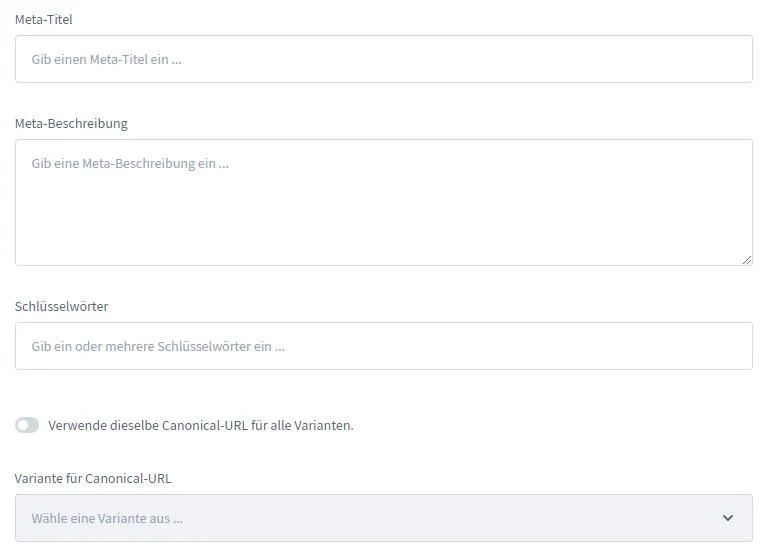
In Shopware, the meta information can now be conveniently defined when creating an item, a category, or a blog article. When you create an item in the Shopware backend, you'll find the fields for the meta title and the meta description at the very bottom of the page, for example. For blog articles, the meta information has been placed in the sidebar.


Tip: From an SEO perspective, you can disregard the meta keywords field. Google has not taken the keywords in the metadata into account for many years. The meta keywords entered there are only used by Shopware for the internal store search.
Avoiding duplicate content with the canonical tag
Duplicate content does not lead to a Google penalty, but the duplicate content can make crawling more difficult and jeopardize rankings. If, for example, you offer a TV model in various sizes and/or colors in the store and use individual item pages for this instead of different variants on one product page, this quickly leads to various pages with the same content. After all, in this case it makes little sense to keep making changes to the text of the product description.
To tell Google in this case which URL is the original, there is the canonical tag. The canonical URL stored in the attribute points the crawler to the page that contains the main content. The search engine thus knows that it's a copy of the original page and no longer takes it into account when evaluating your store page. Duplicate content therefore has no negative consequences anymore. This is also helpful when a product in Shopware is assigned to multiple categories and is therefore accessible via different URLs of the store.
Shopware 6 sets the canonical tag automatically to the SEO path that you have defined for the respective subpage. The URL can be adjusted under Catalogs > Category or Product > Canonical URLs > SEO path. In addition, you can use a free-text field in the Shopware backend to specify a canonical link there.
Internal linking in the Shopware store
Internal links make it easier for the Google crawler to move from page to page and thus get as many store pages as possible included in the index. At the same time, they pass on link juice – that is, the power of a link – that flows from external references (backlinks) to your Shopware store. And last but not least, links entice users to look around the store further and perhaps buy more than originally intended.
Internal links are one of the most underrated SEO measures of all. Therefore, in addition to the navigation links that reflect the structure of the store, also set internal links wherever possible and useful, for example to matching accessories. Feel free to use anchor text that contains the keyword of the target page.
As a general rule: when it comes to SEO, you can't really have too many internal links. On a page, however, Google only ever takes the first internal link to a target page into account. So it's unnecessary to link from one page to the same other page multiple times. If you want to steer the link juice deliberately in order to strengthen a specific page, you should plan and optimize the structure of your internal links carefully in advance.
Sitemaps in Shopware
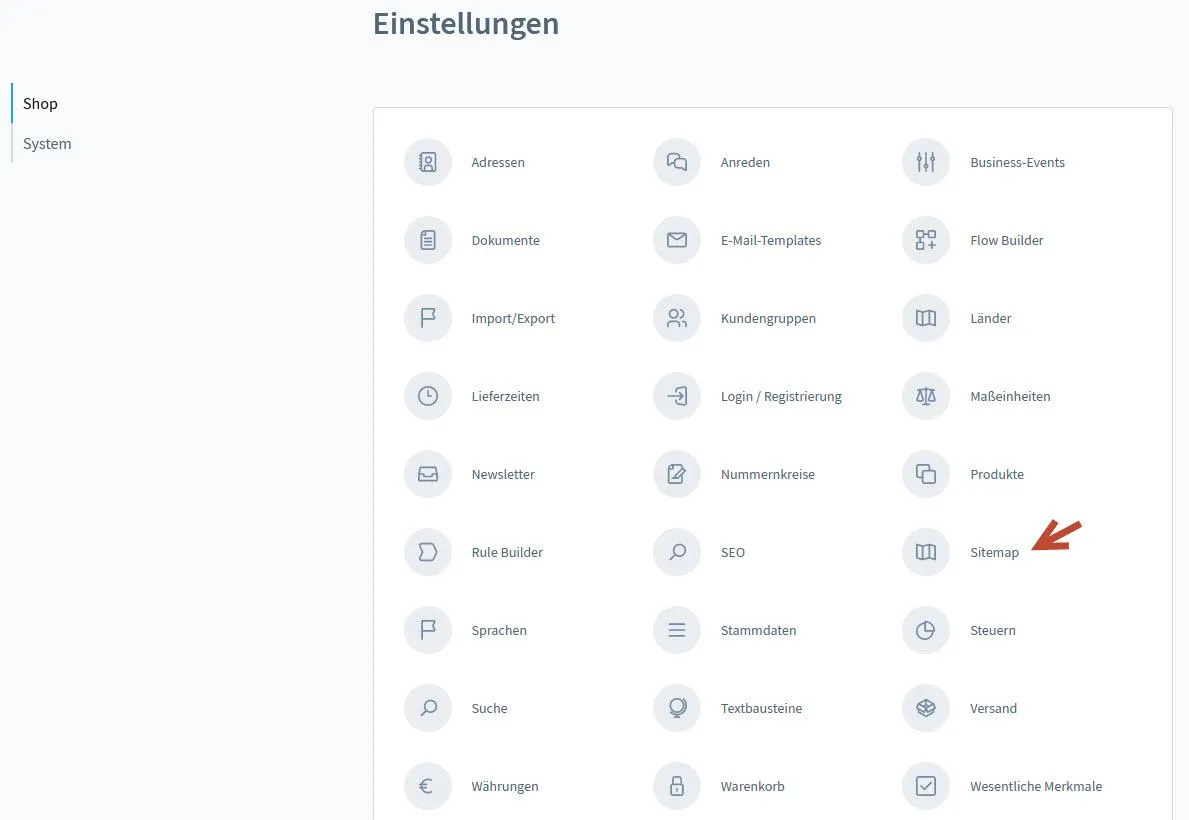
Sitemaps contain all those URLs of your store that are to be included in Google's index. Although the sitemap itself is not a ranking factor, it makes it easier for Google to crawl your Shopware store, which can, for example, speed up the inclusion of new pages in the index. Sitemaps are therefore an integral part of SEO.
Shopware automatically creates an XML sitemap that can be accessed via www.domain.shop/sitemap.xml. Point Google to the sitemap by submitting it in the Google Search Console. The Google tool is free!
Further settings are usually not necessary, as Shopware automatically updates your store's sitemap and Google regularly pulls the new sitemap from the URL. Even when changes are made to URLs, the sitemap file is updated automatically.
The settings for the XML sitemaps, such as the update interval, can be adjusted in the Shopware backend under Settings > Sitemap.
Setting up redirects in Shopware
Nothing is more constant than change. In larger online stores in particular, URLs are constantly changing or products are being phased out. The corresponding pages, which may already have been linked to by other websites, are no longer accessible. The HTTP status code 404 appears, which states that the requested file was not found.
Here Shopware has a big advantage: if you change the name of an item, a category, or a blog article, Shopware automatically changes the URL and sets a 301 redirect, that is, a permanent redirect to the new store URL. 301 redirects also pass on the link juice. After changes, the SEO index should be rebuilt in the Shopware settings and the cache cleared.
It's different when you remove an item from the store because you no longer sell it: in that case, you must use the .htaccess file to set up a manual 301 redirect. Set up such a redirect only as a last resort to the store's homepage. The better target is an alternative product that comes as close as possible to the original, or a category page on which the user, who after all has a specific expectation, finds suitable alternatives from your store.
Shopware plugins for redirects
If configuring via the .htaccess file is too technical for you, you can search the Shopware Store for a plugin that simplifies setting up redirects. The selection is large. Incidentally, there are also helpful plugins for many other SEO measures. However, note that too many plugins can worsen the page speed of your Shopware store.
Robots.txt in Shopware
The robots.txt serves to prevent Google from indexing certain pages. As a rule, these are pages such as the imprint or the privacy policy, which should not appear in Google's results for searches related to the store. Among other things, this reduces the risk of legal warnings for your store. Image files, PDF documents, and video files can also be excluded from indexing in this way in order to save crawl budget.
Shopware 6 no longer has an automatically generated robots.txt file. However, in the Public directory (/public/robots.txt) you can upload your own file for search engine optimization purposes at any time.
Page speed: loading time of the Shopware store
Even though the effect of page speed on rankings tends to be overestimated, a fast online store is important for turning visitors into paying customers. This also applies with regard to the Core Web Vitals, which have been an official ranking factor since 2021.
Compared to other shop systems, Shopware is already quite well positioned when it comes to loading time. Not least because Shopware 6, compared to Shopware 5, has switched to Symfony, a powerful PHP framework. In addition, in front-end development there is an increasing shift from Smarty to Twig, a significantly more powerful template engine. All these steps are to be welcomed from an SEO perspective and will further improve Shopware's performance.
But the Shopware developers can't optimize all the factors that influence page speed. Some SEO factors can only be influenced by the operator themselves. Here are three tips:
- Powerful hosting
The general availability and speed of your store have a direct influence on your revenue. Therefore, look for a reliable web host that, with the help of powerful servers (e.g., with SSD drives) and up-to-date software, ensures the fast loading of your Shopware store – also and especially during times of peak load.
- Compress image files
Without meaningful images, hardly any product sells on the internet. But images are also the biggest resource hogs when it comes to building the page in the browser. So they take the longest to load. At the same time, images are what interests users most in the first moment.
Of course, images should always be of good quality, also so that the user can use the zoom function. However, almost all images can be significantly compressed without any loss of quality being visible to the human eye.
So that you don't have to compress each image manually, there are various Shopware plugins that automatically handle the optimization for you when uploading to Shopware.
- Load JavaScript asynchronously
Since Shopware 5.3, it has been possible to load JavaScript with a time delay, so that the rendering of the store is accelerated. To activate this function, open the Theme Manager. Click on the active template. In the Configuration tab, you'll find the checkbox Load JavaScript asynchronously, which should be checked.
Please pay attention to its performance as early as when choosing your Shopware template. Many templates have been visually optimized by agencies, but are at the same time real resource hogs. The same applies to the templates of the Shopping Worlds, for example for the blog. Another advantage: the leaner and tidier the Shopware template, the less it distracts visitors from the essentials – your products.
Check the Shopware store's loading time with Google tools
You can check your store's page speed with the help of Google PageSpeed Insights. How well your store performs in the Core Web Vitals can be seen in the Google Search Console. Both tools give you concrete tips for improving your SEO values.
OffPage optimization for Shopware stores
In addition to OnPage optimization, optimizing the OffPage factors is indispensable for successful SEO results. Here, external links to your Shopware store in particular play the decisive role. The so-called backlinks are regarded by Google like recommendations and can mean a real booster for search engine optimization (SEO).
As with your texts and images, the same applies to backlinks: quality over quantity. Links from thematically relevant websites are worth significantly more to you as a store operator than those from pages that have no thematic context with your store. A single valuable link brings you more than 100 irrelevant links!
According to Google's guidelines, backlinks may not be bought. This can lead to penalties and undermine your previous SEO measures. Therefore, rely instead on outstanding content that is so good that it gets linked to voluntarily.
As a store operator, you can also win backlinks through clever pricing and creative marketing campaigns. Also take advantage of the option to create a blog and thematic landing pages with Shopware. Texts on such pages are more likely to be linked to than boring item pages. The Shopware Shopping Experiences (formerly Shopping Worlds) offer many options here to make the successes of search engine optimization sustainable.
Tip: Manufacturers as a backlink source
As a store operator, you have a backlink source with great potential in the manufacturers of the products you sell. This is especially true for smaller and medium-sized manufacturers, who are happy to link to sources for their products. After all, that's successful marketing for everyone involved.
Shopware SEO increases conversions and revenue
Nowhere does search engine optimization have a more direct influence on success than with online stores. How much you earn with your store depends on your optimization. Shopware offers you many options for quickly making common SEO settings. Just by implementing these basics in search engine optimization, you have probably optimized more than most of your competition and with it a genuine SEO advantage.
Almost even more important, however, are good texts, images, and videos. Content remains the most important factor for a good ranking in Google's search results. The same applies to backlinks, which increase the authority of your Shopware store. If you want to take SEO for your Shopware project into your own hands for now, you can get support from numerous SEO plugins for Shopware and various common SEO tools.
A professional SEO agency pulls out all the stops of search engine optimization for you and gets the maximum performance out of your store. This pays off especially in a tense competitive environment. If you need support with optimizing your Shopware store, we look forward to your inquiry. Our SEOs know Shopware inside out and support you not only with advice, but above all with successful action.
Rate this text
Average rating: 4.9 / 5. | Number of ratings: 12
Need a GEO check?
Get in touch for more visibility – in search engines and AI answers.
- More visibility and leads via Google and AI chats
- Sustainable SEO & GEO strategies
- Personal support


