
Link Building & Digital PR
Find and Remove Harmful Links (Guide)


A website can literally “get sick.” Sick from too many unnatural or bad backlinks.
The consequences?
The patient faces falling rankings in the search results at Google – or even worse: a fat Google penalty and, with it, being thrown out of the Google index … so that's the end of the site, right?
Wrong!
Bad backlinks that jeopardize your ranking at Google can be devalued with Google's Disavow Tool.
A few quick entries in some cheap web directories may only come back to bite you years later, or a nasty competitor deliberately places unnatural backlinks to your website. The result is that your site drops in the rankings and your competitor's overtakes you. With Google's Disavow Tool, you have a chance to undo these actions again.
But one thing at a time. In the following post, I'll show you:
- How to recognize unnatural backlinks
- How to find out whether your website's link profile has harmful links
- How you can remove or have them devalued
How to Recognize Unnatural Backlinks
Google has significantly tightened the criteria when it comes to link building. In the past, the one who was often in the top spots at Google was the one with the most backlinks. Where these backlinks came from didn't matter; only the sheer quantity counted.
Many link spammers took advantage of this and developed automated SEO tools that generated a lot of backlinks without you having to do anything yourself. A few years ago, this still guaranteed the vast majority of websites a good ranking – by now, Google has gotten smarter.
Google now recognizes unnatural link building very well, and that is why unnatural links have become so dangerous.
When checking a link to see whether it is harmful (unnatural) or not, you should keep the following points in mind:
– Is the link to your website topically relevant?
Websites that have nothing to do with your website's topic usually don't link to you. Why would they?
So pay attention to which topical environment the links come from.
Example: You run a website about soccer cleats and have a link from a women's handbags blog … such a link is probably not exactly topically relevant, is it? ;-)
Even worse are links from websites that don't have the same language as yours. So if Chinese or Russian websites link to your site, you should check these links more closely.
– Is the link from a high-quality or low-quality website?
The question of all questions when evaluating links: Is the linking website high-quality or not?
The following points indicate a rather low-quality link:
- The website you have a link from itself has very many bad backlinks and/or a Google penalty (websites with bad backlinks partly pass on their negative power – see also Bad Neighbourhood)
- The website is a link farm (the site has a large number of outgoing links, as is the case, for example, with many web directories)
- The website has a lot of advertising (the site is full of ad banners, affiliate links, etc.)
- The website is dead/is no longer maintained (the last current post is years old)
- The website is ugly or not modern (if the design hurts your eyes, that can already be very suspicious)
- SEO tools such as Majestic.com or, even better (though more expensive), LinkResearchTools.com help you analyze your backlinks from other websites. This makes it possible to quickly uncover harmful SPAM backlinks.

I already explained in a previous post how to recognize a good backlink. Seen this way, you just have to reverse the criteria that speak for a good backlink in order to check whether the backlink is of low quality for your site or not. If your site has especially many links of lousy quality, this can negatively affect your ranking at Google.
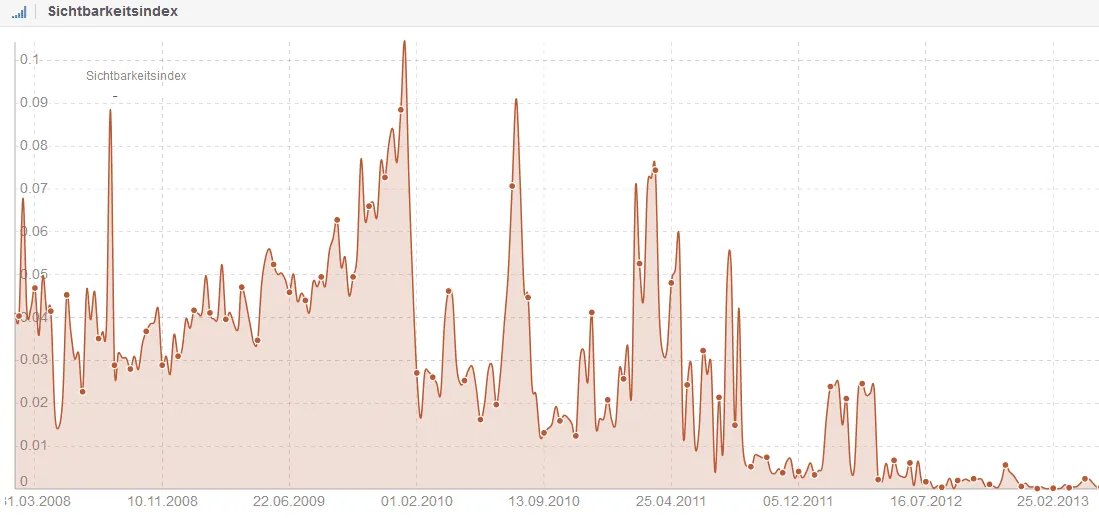
Whether a site has a penalty from Google you can tell, for example, by analyzing the visibility index with Sistrix (there is a free check here). If the graph drops sharply, it could be a penalty. Google has withdrawn its trust from such a website – surely nobody wants a link from this source. ;-)
– Is the link hidden in the footer or in the sidebar?
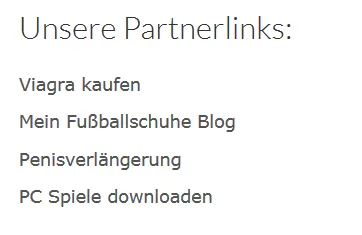
Many webmasters who sell or rent links place their clients' links in the sidebar or in the footer. This often creates bizarre lists that also make Google suspicious.
Example: With a link to your website in such a sidebar, caution should be exercised->
– Was an article published with only a single link?
If the website has published a great many articles where only a single outgoing link can be found in each post, that can also be an indication that links are being sold here. Since Google prohibits the buying/selling of links, having a link from such a website can have negative effects.
– Check the anchor text or link text of the backlink to your website
Another good indication of a harmful backlink is the link text with which the link (anchor text) to your site was placed. If strange terms such as “Viagra” or other terms that absolutely don't fit your website are used here, your alarm bells should ring. A nasty competitor may be trying to take down your site with spam links.
How to Find Out Whether You Have Bad Backlinks in Your Link Profile
Under Google Webmaster Tools (now “Search Console”), a large part of your backlinks is shown to you. To do this, click on your website in the Webmaster Tools dashboard, then on “Search queries,” and after that on “Links to your site.” Under “Who creates the most links?” you'll find all the links that the tool has found. In this blog post, you'll learn how registering your website with Google is possible.

Here, it is of course advisable to check every single link closely.
Since Search Console unfortunately, in my experience, doesn't always find all the links, I also recommend using the tools Majestic and Ahrefs to support the link analysis. This makes it possible to find and analyze even more backlinks.
If you want to make it easier, you should take a look at LinkResearchTools.com (LRT). With it, your site's link profile can be analyzed and evaluated in great detail. Anyone who uses this tool needs almost no other aids for the analysis, because the LinkResearchTool really finds 99.9% of every link. Of course, it's never wrong to cross-check with other tools now and then. The rather high price of the tool is the only downside here.
Removing or Having Unnatural Backlinks Devalued
With the help of the Disavow Tool, unnatural links can be devalued from the backlink profile. With the tool, you can practically tell Google: “Hey Google, please ignore the link from the domain xyz.abc.”
In order to be able to use the tool, you have to log in to Google Webmaster Tools. After you have logged in, open the Disavow Tool via the following link.
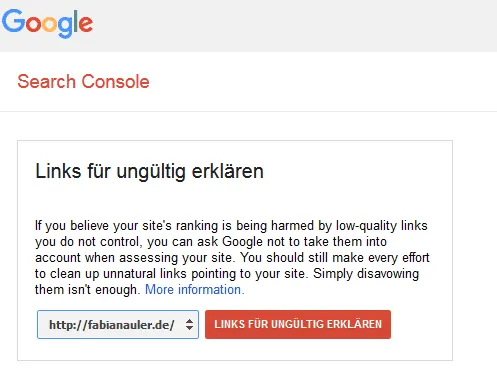
Then click on “Disavow links” and then the “Choose file” button. There you then have to upload a .txt file with all the links and domains that you want to disavow.

The information in the .txt file can look like this, for example:
#The links from these domains should no longer be considered in my link profile:
domain:www.spam.de
domain:www.spam1.de
domain:www.spam12.com
#Specific URLs that should not be weighted by Google:
http://www.spam123.net/seite-45
http://www.spam123.net/seite-46
With the “#” symbol, information and comments can be built into the .txt file that should not be taken into account for the devaluation of the links.
Important note 1: Before you now recklessly devalue every seemingly unnatural link, you should keep the following in mind: If you mistakenly have good links devalued, you will thereby additionally weaken your ranking at Google. So check carefully which links you include in the .txt file.
Important note 2: Google has emphasized often enough that the Disavow Tool should be used as a last resort for cleaning up the link profile. It is always better to have the links removed directly. If, for example, you have backlinks from some link farm, it can be advantageous to write to the operators directly and ask them to remove the link. The Disavow Tool should only be used for links that (despite repeated requests) were not removed by the site operators.
Note from the community: On disavowhelper.com, you can enter the harmful links of your domain, and a ready-made disavow file is automatically provided to you.
By which criteria do you evaluate your website's link profile? Have you ever used the Disavow Tool? Were you able to notice improvements afterward? If you can answer these questions or have had other experiences, I would be very happy about a comment from you.
-Fabian
Need a GEO check?
Get in touch for more visibility – in search engines and AI answers.
- More visibility and leads via Google and AI chats
- Sustainable SEO & GEO strategies
- Personal support


